
web2wave provides a comprehensive analytics suite that captures the entire user journey from the first click to a successful subscription. Whether you rely on our built-in dashboards or integrate with external systems like Amplitude and Meta, we ensure your data is accurate, actionable, and easy to manage.
- Automatic Event Tracking
You don’t need to set up basic tracking manually. web2wave automatically logs standard events as users progress through your funnel.
- Automatic Tracking: All standard funnel events are logged automatically without manual configuration.
- Event Naming: System events like Step 03 [ID] are generated based on the Screen ID assigned in the builder.
- Synchronous Dispatch: Events are sent simultaneously to internal servers and all connected external platforms (Amplitude, Mixpanel, etc.).
- Data Sovereignty: All raw events are stored on App2Wave servers and can be exported to your own database or server if required.
- Meta Conversion API (CAPI) and Optimization
To change the limitations of browser-based tracking (like AdBlockers), web2wave uses CAPI to send events directly from our server to Meta.
If the payment happens on your own website (not a web2wave paywall), send Purchase from that page with the Web2Wave JS SDK. You do not install the Meta Pixel there — the SDK posts the event to web2wave, and web2wave forwards it to Meta CAPI (and TikTok / Google if those are connected).
Standard vs. Custom Events
- Algorithmic Learning: Meta optimizes best using Standard Events (e.g., Purchase, Subscribe) because it processes billions of these signals globally.
- CAPI Filtering: To avoid overwhelming Meta's servers, only critical standard events are sent via CAPI by default.
- The "Purchase" Preference: It is generally recommended to map your primary conversion to Purchase rather than Subscribe, as Meta has more data to optimize for buyers.
MetaPixel ID setting up:
-
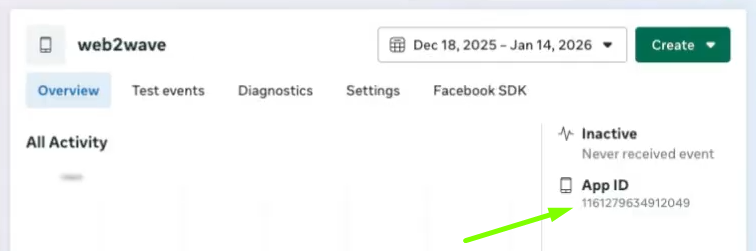
Go to Meta Ads Manager - Events Manager - Datasets
-
Create New Pixel
-
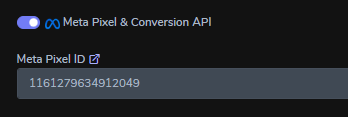
Copy App ID number and add it into web2wave platform - Analytics - Meta Pixel ID field
-
Add Facebook Access Token
-
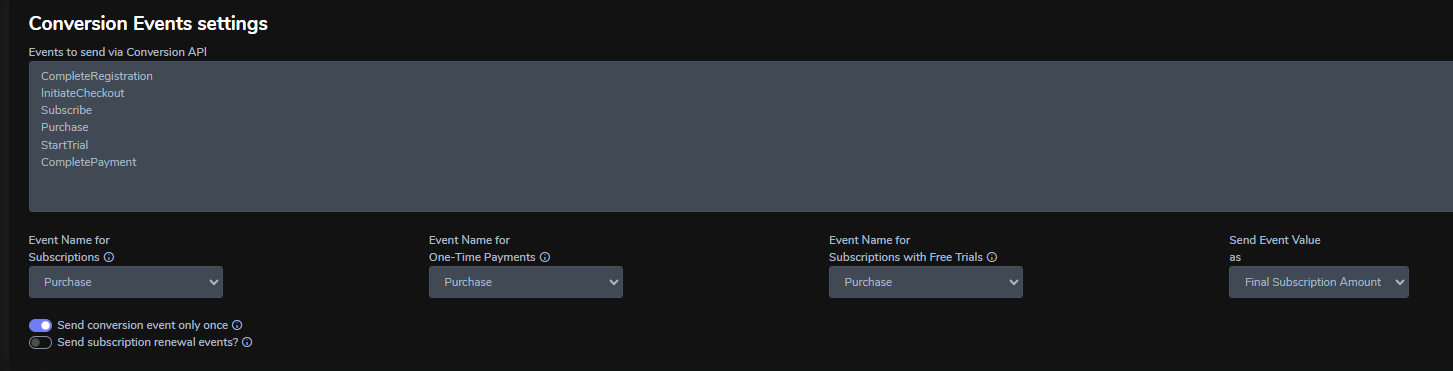
Set up standard Facebook events in Conversion Events settings to receive only the necessary events
-
Always keep the "Send conversion event only once" checkbox enabled
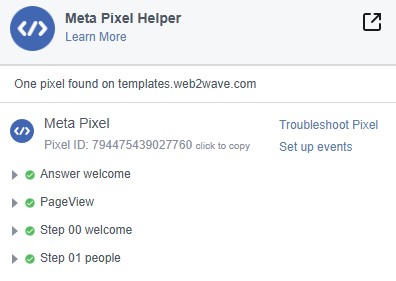
MetaPixel Helper
- Install the MetaPixel Helper extension to verify browser-side events.
- Run the quiz
- The extension shows which Pixel ID is active and lists the specific events received.
Note: AdBlockers or VPNs may block browser pixels, causing the helper to show the pixel exists but no events are being sent.
- Debugging Your Events
To ensure your events are firing correctly during setup, you can use two primary debugging methods:
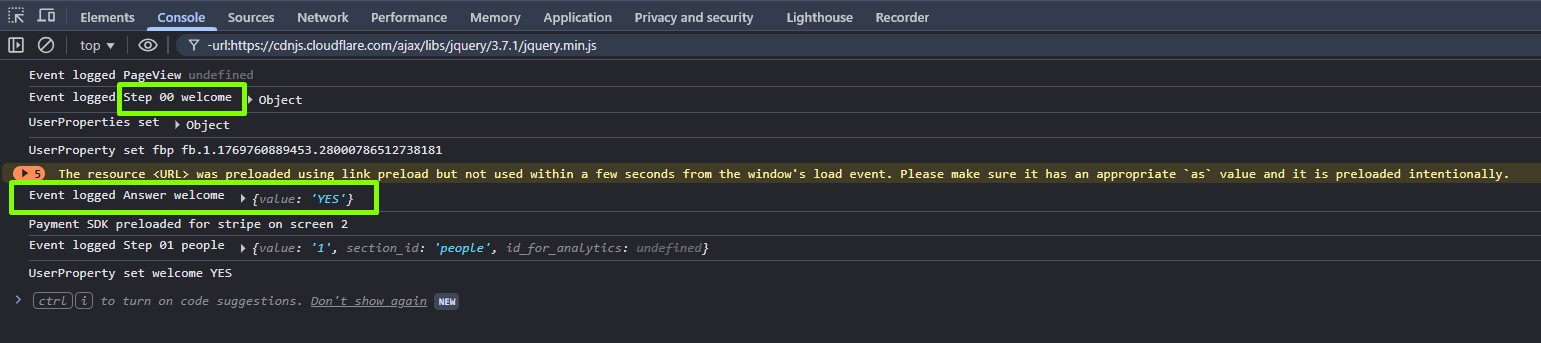
- Open your browser’s developer tools (F12) to monitor the event stream.
- Look for
Event loggedwhen an event is sent andUserPropertywhen user parameters are updated. - You will see logs such as
Step 00 Welcomeupon entry orAnswer Welcomeafter a user interaction.
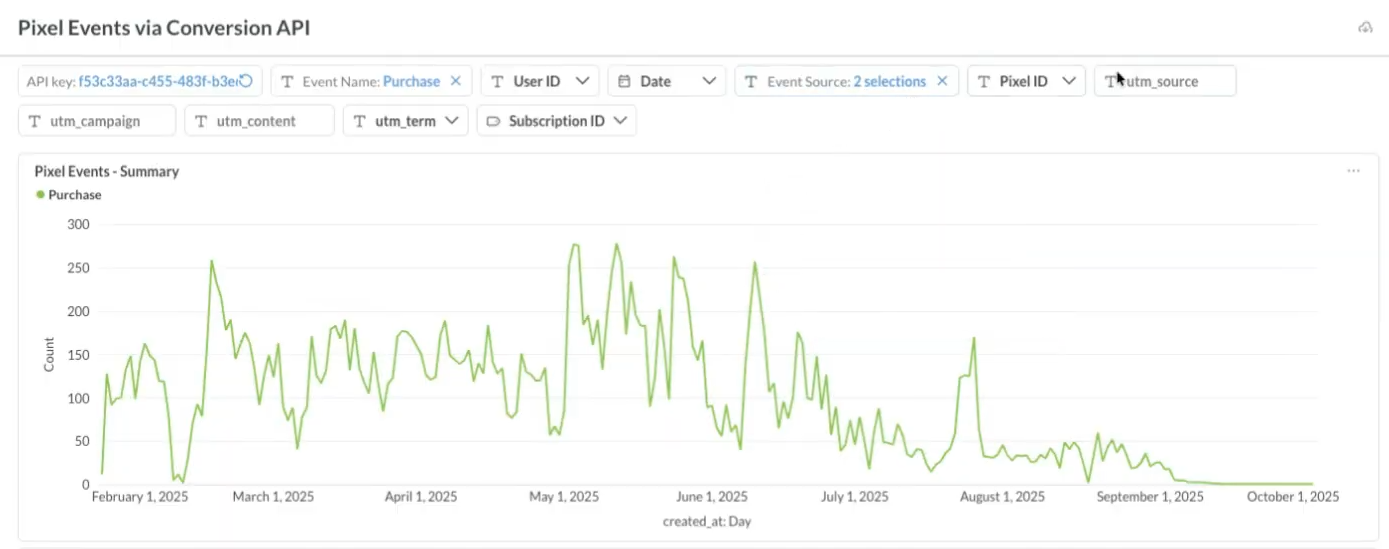
Debugging with Pixel Events via Conversion API
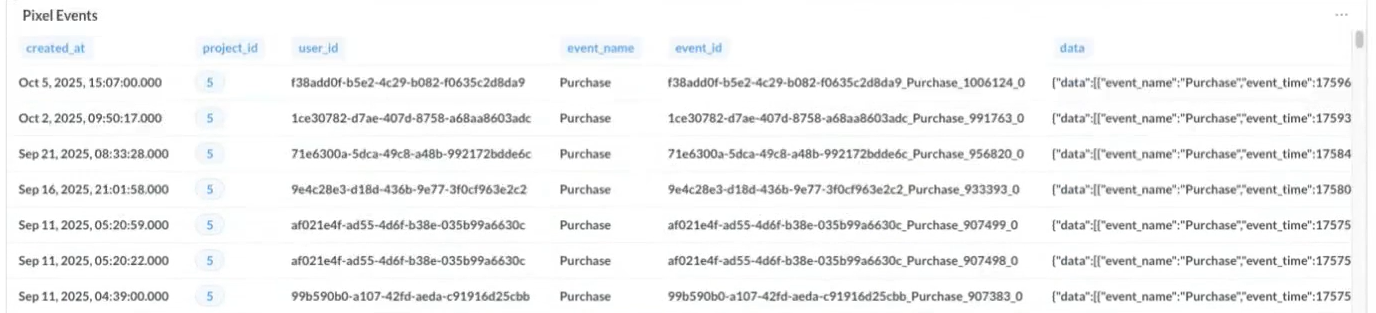
The dashboard helps you to use different filters to find specific events that were sent to Meta
- Go to "Log if events sent using Conversion API" link
- Pixel Events log shows all events that was sent to Facebook
- By choosing
user_idyou can find all relevant events
Note: When an upsell process happens, a few events might be sent at the same time - it is ok
- Revenue and Value Optimization
Tracking revenue accurately is critical for calculating ROAS. You can customize how purchase values are reported to Meta and TikTok:
- Value Selection: Choose between the Charged Amount (the actual price paid) or the Final Subscription Amount (useful for reporting the full value of a trial that will convert to a paid plan).
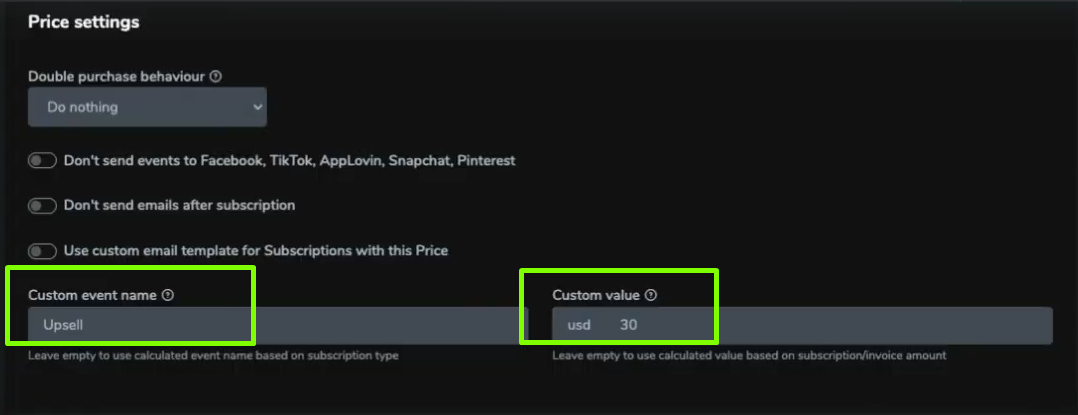
- Custom LTV Values: If you know your average customer LTV (e.g., a $9.99 weekly sub usually lasts 3 weeks), you can set a custom value like $30.00 to be sent to the ad platform.
- Upsell Management: You can rename events for upsells so they don't interfere with your primary optimization event, allowing ad platforms to focus purely on first-time conversions in the Price settings.
- "Send conversion event only once" toggle controls how subscription events (as defined in Project Settings) are sent. When disabled, subscription events are triggered on every page load, which is uncommon and usually happens in projects with multiple redirects to external pages. When enabled, the purchase event is sent only once and is not triggered again on pages after payment, such as upsells. Upsell events are still sent, as they are tracked separately. This setting applies only to subscription-related events.
- "Send subscription renewal events?" toggle allows you to send renewal events (rebill) to Facebook, Snapchat, and TikTok. It might help if you offer a free trial, and you don't need Facebook optimization for "trial to real" clients low conversion scenario.
Meta attribution notes Meta’s default attribution window is usually 7 days after the click. Events that happen later are often not attributed to the original ad and may not be used for optimization. Because of this, long delays between click and payment limit how well campaigns can learn and scale. For example, a 3‑day free trial and optimize your Meta campaigns for the rebill event that happens 3 days later is technically possible, but rarely works at scale for most advertisers.
- Advanced Customization via JavaScript API
Different platforms require different data formats. web2wave handles these transformations through built-in logic and custom scripts.
- Event Renaming: Systems like Google Analytics 4 and AppLovin use unique terminology (e.g., begin_checkout instead of initiate_checkout); web2wave automatically renames these events to ensure compatibility.
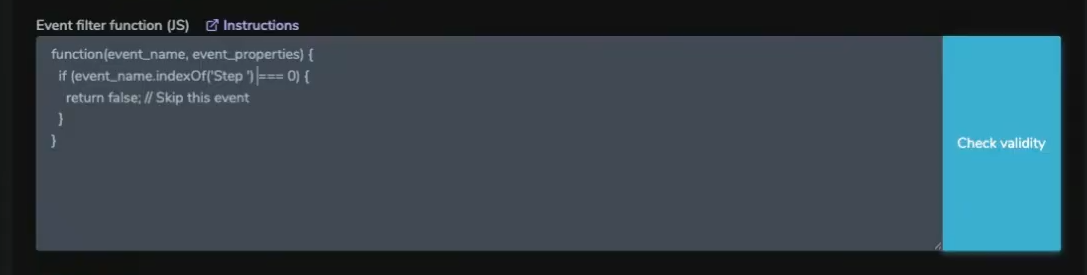
- JavaScript Filtering: You can write custom JS functions to filter out "noisy" events (like specific quiz steps) from being sent to external platforms.
- Dynamic Value Adjustment: Functions can be used to multiply event values based on user properties, such as increasing the reported value for users from high-LTV regions
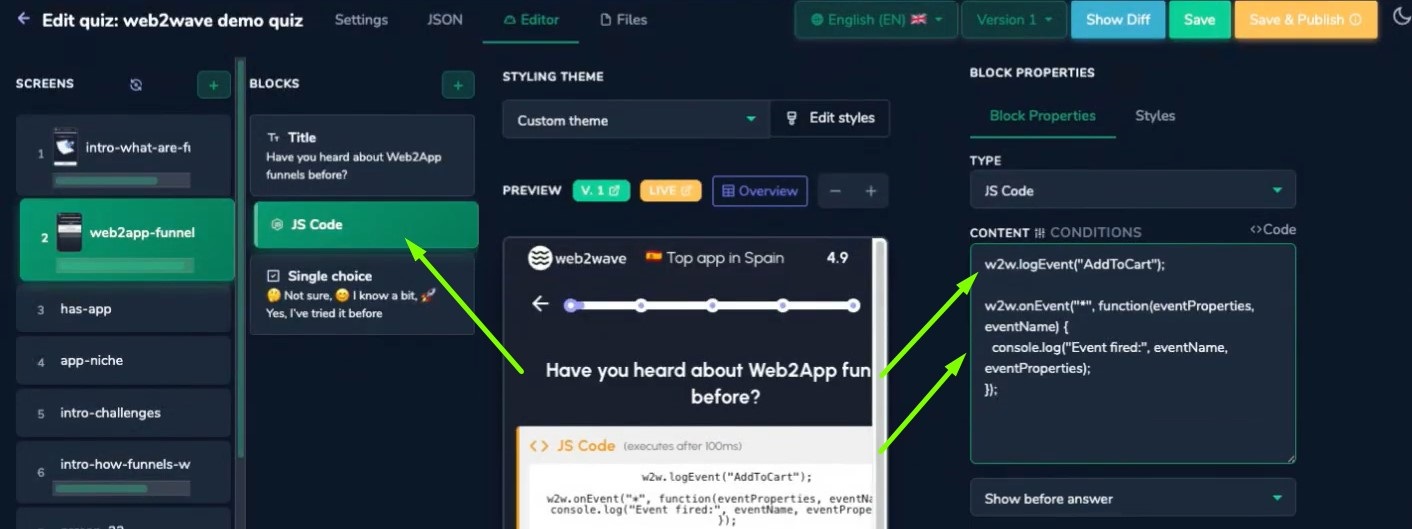
- By adding in the quiz JS Code block with code
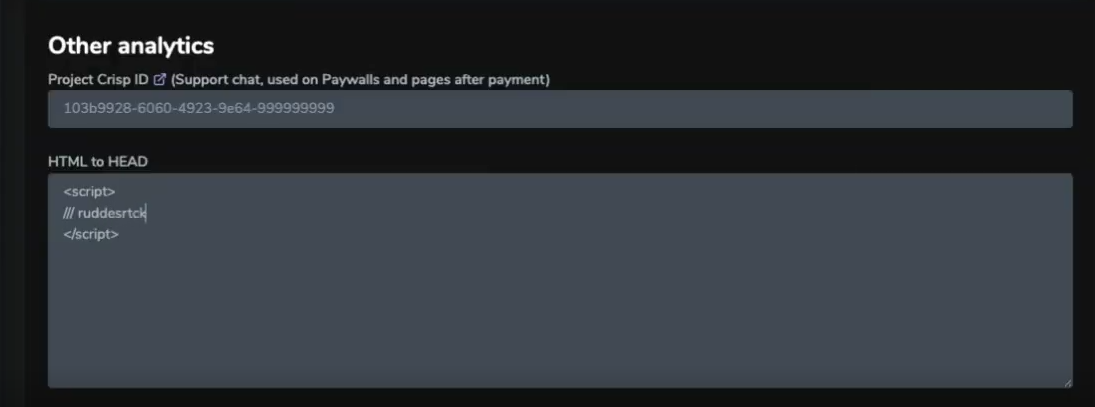
w2w.logEvent("AddToCart")you can set JS API to send events, launch user properties, and subscribe to the resend of events. - For rudderstack add a script in "HTML to HEAD" field in Analytics settings and JS code in the JS Code block in the quiz. It can help you with integration with an external analytical system.
.
- UTM Reporting and ROAS
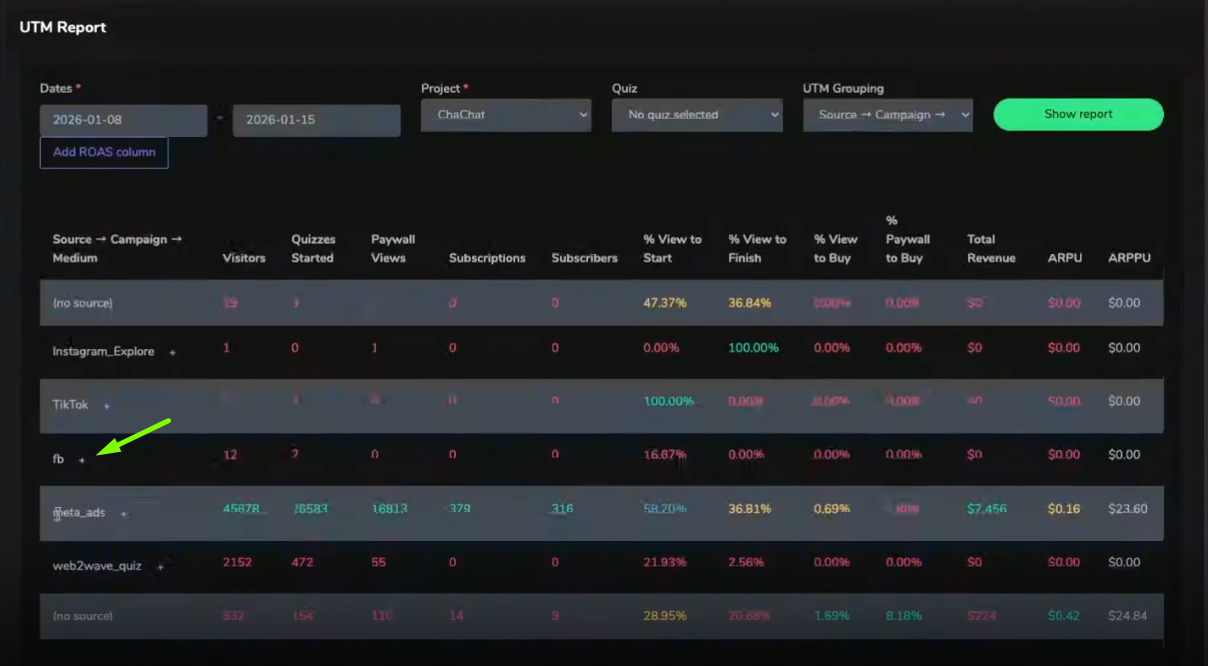
The UTM Report links your marketing spend with actual user behavior. It helps to control your ad campaign performance by analyzing your UTM parameters.
- Hierarchical Tracking: View performance by Source, Campaign, AdSet, and Ad based on standard UTM parameters.
- Spend Import: Connect a Meta Ad Account in Projects → your project → Ad Accounts and web2wave imports cost data once every 24 hours. TikTok and Google Ads are listed there as coming soon, so spend import is Meta only for now.
- ROAS Analysis: Once spend is imported, the report adds Spend, ROAS, Clicks, and Conversion Events columns next to your revenue, so you can see which ads are truly profitable. Use the Add ROAS column button in the UTM report, or the Show pLTV-XX / ROAS columns in UTM report toggle in Project → Analytics.
- UTM Reports allow you to analyze all ad campaigns by clicking on the "+" button and a specific campaign in particular
Full walkthrough — authorizing the ad account, switching the columns on, and what to do when Spend is empty: Connect a Meta Ad Account — spend and ROAS in the UTM report.

Troubleshooting:
Q: We’ve launched an email sequence, but we don’t see any data in the UTM report, why?
A: Make sure your email links don’t contain a # symbol in the URL.
When a # (hash fragment) is used, everything after it is not sent to the server - meaning the UTM parameters won’t be captured or reported. This prevents analytics from tracking traffic sources correctly.
Invalid link: https://quiz.example.com/paywall/paywall#paywall?utm_source=email&utm_medium=email_sequence1
Correct link example: https://quiz.example.com/paywall/paywall?utm_source=email&utm_medium=email_sequence1&user_id={user_id}#paywall