
Webhook Documentation
Overview
Web2Wave sends webhooks for key project events so downstream systems (CRMs, analytics, internal tooling) can react in real time.
Multiple Webhook Destinations (Cabinet)
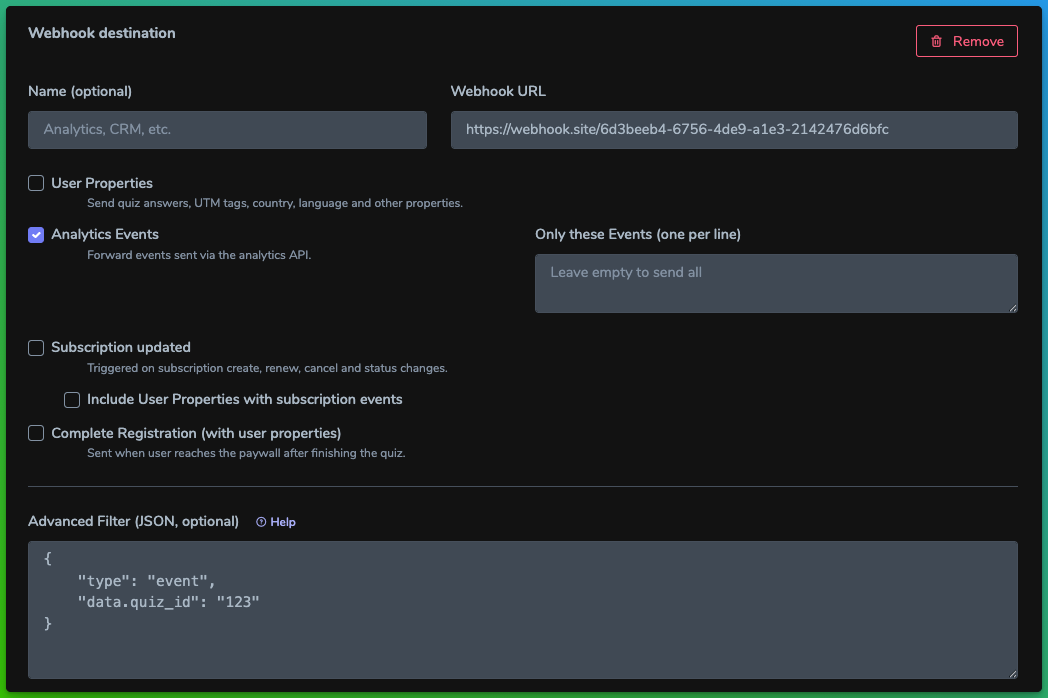
The Cabinet → API & Webhooks screen stores multiple webhook cards per project. Each card persists inside the project settings and controls its own filters.
- Click Add webhook.
- Provide a Name and Webhook URL (public HTTPS is required for production traffic).
- Enable the payload types the endpoint should receive:
- User Properties – individual property updates.
- Analytics Events – quiz and paywall events.
- Subscription updated – subscription lifecycle changes.
- Complete Registration event with User Properties – the full property bundle when the quiz is finished.
- (Optional) Narrow delivery by filling Allowed user properties or Allowed events with newline-separated identifiers. Leave blank to send everything for the enabled type.
- Toggle Include user properties with subscription or Format as Funnelfox when the integration expects those shapes.
- Save — the queue picks up the new configuration immediately.
Delivery visibility
- Every attempt lands in the
project_webhook_logstable with response code, latency, and a truncated error message when applicable. - Retries follow the job backoff; once a call succeeds the log row remains with
success = 1.
Legacy modes
Older projects might still rely on:
- Single Webhook URL – the legacy single destination. It still works, but plan to migrate the configuration into cards for easier routing.
- Webhook Gateway (Convoy) – deprecated. If you keep Convoy enabled, ensure overlapping Cabinet cards stay disabled to avoid duplicate deliveries and schedule a migration.
Available Webhook Types
user_property- Sent when user properties are created or updatedevent- Sent for analytics events tracked in your applicationsubscription- Sent when subscription status changesCompleteRegistration- Sent when a user completes the quiz and reaches the paywall
General Requirements
- URL requirements: configure the destination in project settings and use
http://orhttps://. Production projects should expose HTTPS endpoints. - Timeout: respond within 3 seconds or the connection is aborted.
- Format: payloads are JSON encoded in UTF-8.
- Authentication: every request includes the
Webhooks-Tokenheader with the project secret. Rotate the secret if it leaks and treat it like an API key.
Webhook Structure
All webhooks follow this basic structure:
{
  "type": "webhook_type",
  "data": {
    // Type-specific data
  }
}
Fields:
type(string): The webhook event typedata(object): Event-specific data
Webhook Types
Note that web2wave always send the data using a POST request.
type: "user_property"
Sent every time a user property is added or modified. This includes quiz answers, UTM parameters, user location data (country_code, language), and any custom properties.
When triggered:
- New user property is set
- Existing user property is updated
Data fields:
| Field | Type | Description |
|---|---|---|
project_domain | string | Domain of the project |
user_id | string | Unique user identifier (GUID) |
property | string | Property name (e.g., "email", "utm_source", "answer_1") |
value | string | Property value (multiple values separated by "||") |
Example:
{
  "type": "user_property",
  "data": {
    "project_domain": "app.web2wave.com",
    "user_id": "f555ab28-a2b8-447d-9fe9-3c17e6ac70f4",
    "property": "2_question",
    "value": "Of course, yes"
  }
}
type: "event"
Sent for every analytics event tracked in your application.
When triggered: Any custom event is logged (e.g., button clicks, page views, form submissions)
Data fields:
| Field | Type | Description |
|---|---|---|
created_at | string | Event timestamp (ISO 8601) |
user_id | string | Unique user identifier (GUID) |
project_domain | string | Domain of the project |
quiz_id | string | Quiz identifier |
quiz_name | string | Name of the quiz |
event_name | string | Name of the event |
event_value | string | Event value |
event_properties | string|null | JSON-encoded event properties |
url | string | Page where event occurred |
initial_url | string | Initial page URL with UTM parameters |
user_agent | string | User's browser information |
user_time | string | User's local time |
user_locale | string | User's language/locale |
app_version | string | Application version |
quiz_version | string|null | Quiz version |
experiment | string|null | A/B test experiment name |
experiment_group | string|null | A/B test variant |
additional_data | string|null | JSON-encoded additional data |
ip | string | User's IP address |
paywall_name | string|null | Paywall name if applicable |
paywall_version | string | Paywall version |
user_visit | string | Visit identifier |
Example:
{
  "type": "event",
  "data": {
    "created_at": "2024-06-12T19:19:18.000000Z",
    "user_id": "f555ab28-a2b8-447d-9fe9-3c17e6ac70f4",
    "project_domain": "app.web2wave.com",
    "quiz_id": "5",
    "quiz_name": "Product Quiz",
    "event_name": "Answer radio 2_question",
    "event_value": "Of course, yes",
    "event_properties": "{\"value\":\"Of course, yes\"}",
    "url": "https://app.web2wave.com/#2_question",
    "initial_url": "https://app.web2wave.com/?utm_source=google&utm_campaign=my_campaign",
    "user_agent": "Mozilla/5.0 (Macintosh; Intel Mac OS X 10_15_7) AppleWebKit/537.36",
    "user_time": "9:19:18 PM",
    "user_locale": "en",
    "app_version": "1.0",
    "quiz_version": null,
    "experiment": null,
    "experiment_group": null,
    "additional_data": null,
    "ip": "192.168.1.1",
    "paywall_name": null,
    "paywall_version": "1.0",
    "user_visit": "visit_123"
  }
}
type: "CompleteRegistration"
Sent when a user completes the quiz and reaches the paywall, including all user properties. This is useful for tracking quiz completions and passing all collected user data to your systems.
When triggered:
- User finishes the quiz and is shown the paywall
- Only sent if "CompleteRegistration event with User Properties" is enabled in webhook settings
Data fields:
| Field | Type | Description |
|---|---|---|
created_at | string | Event timestamp |
user_id | string | Unique user identifier (GUID) |
project_domain | string | Domain of the project |
event_name | string | Always "CompleteRegistration" |
properties | array | All user properties (same format as user_property webhook) |
Example:
{
  "type": "CompleteRegistration",
  "data": {
    "created_at": "2024-06-12T19:20:00.000000Z",
    "user_id": "f555ab28-a2b8-447d-9fe9-3c17e6ac70f4",
    "project_domain": "app.web2wave.com",
    "event_name": "CompleteRegistration",
    "properties": [
      {
        "project_domain": "app.web2wave.com",
        "user_id": "f555ab28-a2b8-447d-9fe9-3c17e6ac70f4",
        "property": "email",
        "value": "[email protected]"
      },
      {
        "project_domain": "app.web2wave.com",
        "user_id": "f555ab28-a2b8-447d-9fe9-3c17e6ac70f4",
        "property": "utm_source",
        "value": "google"
      },
      {
        "project_domain": "app.web2wave.com",
        "user_id": "f555ab28-a2b8-447d-9fe9-3c17e6ac70f4",
        "property": "answer_1",
        "value": "Option A"
      },
      {
        "project_domain": "app.web2wave.com",
        "user_id": "f555ab28-a2b8-447d-9fe9-3c17e6ac70f4",
        "property": "user_country_code",
        "value": "US"
      },
      {
        "project_domain": "app.web2wave.com",
        "user_id": "f555ab28-a2b8-447d-9fe9-3c17e6ac70f4",
        "property": "user_language",
        "value": "en"
      }
    ]
  }
}
type: "subscription"
Sent when subscription status changes (created, renewed, cancelled, etc.).
When triggered:
- New subscription created
- Subscription renewed
- Subscription cancelled
- Payment succeeded/failed
- Subscription status changed
Data fields:
| Field | Type | Description |
|---|---|---|
created_at | string | Subscription creation timestamp (ISO 8601) |
updated_at | string | Last update timestamp (ISO 8601) |
payment_system | int | Payment system identifier |
payment_system_label | string | Payment system name (e.g., "Stripe") |
real_payment | int | Production mode (1) or test mode (0) |
pay_system_id | string | Payment system's subscription ID |
project_domain | string | Project domain |
quiz_name | string | Associated quiz name |
quiz_id | string | Quiz identifier |
paywall_name | string | Paywall name |
paywall_id | string | Paywall identifier |
price_id | string | Price/plan identifier |
amount | float | Amount in cents |
amount_real | float | Amount in real currency |
currency | string | Currency code (e.g., "usd", "gbp") |
canceled_at | string|null | Cancellation timestamp or null |
customer | string | Customer ID in payment system |
status | string | Subscription status (see Status Options below) |
next_charge_date | string|null | Next payment date (ISO 8601) |
last_charge_date | string|null | Last payment date (ISO 8601) |
charges_count | int | Total number of charges |
total_revenue | int | Total revenue in cents |
total_revenue_usd | int | Total revenue in USD cents |
user_id | string | User identifier |
user_email | string | User's email address |
manage_link | string|null | Subscription management URL |
event_type | string | Payment system event (e.g., "charge.succeeded") |
price | object | Detailed price information |
invoices_new | array | List of invoice objects |
properties | array|null | User properties (if enabled) |
user_visit | object | Visit tracking information |
Status Options:
active- Active subscriptionincomplete- Incomplete setupincomplete_expired- Setup expiredtrialing- In trial periodpast_due- Payment overduecanceled- Subscription canceledunpaid- Payment failedpaused- Subscription paused
Example:
{
  "type": "subscription",
  "data": {
    "id": 12345,
    "user_id": "f555ab28-a2b8-447d-9fe9-3c17e6ac70f4",
    "user_email": "[email protected]",
    "created_at": "2024-06-12 19:20:00",
    "updated_at": "2024-06-12 19:25:00",
    "payment_system": 0,
    "payment_system_label": "Stripe",
    "real_payment": 1,
    "pay_system_id": "sub_1234567890",
    "project_domain": "app.web2wave.com",
    "quiz_id": "5",
    "quiz_name": "Product Quiz",
    "paywall_id": "10",
    "paywall_name": "Premium Paywall",
    "price_id": "price_1234567890",
    "plan_name": "Monthly Plan",
    "price_label": "Premium",
    "price_description": "Full access to all features",
    "amount": 2999,
    "amount_real": 29.99,
    "currency": "usd",
    "canceled_at": null,
    "cancel_at_period_end": 0,
    "customer": "cus_1234567890",
    "status": "active",
    "cancel_scheduled": "No",
    "next_charge_date": "2024-07-12 19:20:00",
    "last_charge_date": "2024-06-12 19:20:00",
    "charges_count": 1,
    "total_revenue": 2999,
    "total_revenue_usd": 2999,
    "manage_link": "https://billing.stripe.com/p/session/...",
    "price": {
      "id": 100,
      "external_id": "price_1234567890",
      "amount": 2999,
      "currency": "usd",
      "interval": "month",
      "plan": {
        "id": 50,
        "name": "Monthly Plan",
        "description": "Full access to all features"
      }
    },
    "invoices": [],
    "invoices_new": [
      {
        "id": 1,
        "subscription_id": 12345,
        "amount": 2999,
        "amount_usd": 2999,
        "currency": "usd",
        "status": "paid",
        "created_at": "2024-06-12T19:20:00.000000Z",
        "pay_system_invoice_id": "in_1234567890"
      }
    ],
    "user_visit": {
      "id": "visit_123",
      "utm_source": "google",
      "utm_medium": "cpc",
      "utm_campaign": "summer_sale",
      "initial_url": "https://app.web2wave.com/?utm_source=google&utm_campaign=summer_sale"
    },
    "user_visit_id": "visit_123",
    "send_event_name": "Purchase",
    "send_event_amount": 29.99,
    "properties": [
      {
        "project_domain": "app.web2wave.com",
        "user_id": "f555ab28-a2b8-447d-9fe9-3c17e6ac70f4",
        "property": "email",
        "value": "[email protected]"
      },
      {
        "project_domain": "app.web2wave.com",
        "user_id": "f555ab28-a2b8-447d-9fe9-3c17e6ac70f4",
        "property": "utm_source",
        "value": "google"
      }
    ]
  }
}
Configuration Options
In your project webhook settings, you can configure:
Event Type Filtering
- User Property: Every user answer, UTM tags, location data, etc.
- Analytics Events: All tracked events in your application
- Subscription updated: When subscription status changes
- CompleteRegistration event with User Properties: When quiz is completed
Additional Options
- Filter specific events: Specify exact event names to receive (one per line)
- Filter user properties: Specify which user properties to include (one per line)
- Include User Properties with Subscriptions: Add all user properties to subscription webhooks
- Advanced Filter (JSON): Use JSON filters to conditionally send webhooks based on payload data (see Advanced Filters section below)
Testing Webhooks
Use webhook.site for testing and debugging your webhook integration.
Best Practices
- Verify webhook authenticity using the
Webhooks-Tokenheader - Respond quickly (within 3 seconds) to avoid timeouts
- Return 2xx status codes to acknowledge receipt
- Handle duplicates - webhooks may be sent multiple times
- Process asynchronously - acknowledge receipt immediately, then process in background
- Log webhook data for debugging and audit purposes
Error Handling
- Webhooks that timeout or receive non-2xx responses may be retried
- Failed webhooks are logged for troubleshooting
- Ensure your endpoint can handle concurrent requests
Multiple Webhook URLs (Built-in Delivery)
Use the Multiple Webhook URLs section in the project settings to configure first-party webhook delivery without Convoy. Each entry has its own name, destination URL, and event filters.
Adding a webhook
- Open the project in the cabinet and navigate to API & Webhooks.
- Click Add webhook. Give the entry a clear name so teammates know what it does.
- Paste the destination URL. HTTPS is recommended for production.
- Enable the event types that should be delivered to this URL:
- User Properties — forwards quiz answers and profile fields. Add property keys line by line to send only specific values.
- Analytics Events — forwards events recorded through the analytics API. Provide event names line by line to limit delivery.
- Subscription updated — fires on subscription create, renew, cancel, and status changes.
- Include user properties with subscription events — attaches the latest user properties to the subscription payload.
- Complete Registration — triggers when a user finishes the quiz and reaches the paywall, including user properties.
- Format subscription payload as Funnelfox — converts the subscription payload into the structure expected by Funnelfox.
- (Optional) Add more webhook entries to route different event types to different destinations.
- Save the project. The cabinet validates the URLs and preserves the configuration.
Delivery behavior
- All webhooks include the
Webhooks-Tokenheader. Use the value from the project settings to verify authenticity on your server. - Failed attempts are automatically retried according to the job retry policy.
- Every dispatch—success or failure—is stored in the
project_webhook_logstable with response status, payload, and error message. - Legacy
client_webhook_urldeliveries follow the older toggle settings and can run in parallel with Multiple Webhook URLs for gradual migration.
Testing tips
- Use webhook.site or a local server (
php -S localhost:4444) to inspect incoming requests while configuring a new entry. - Check
project_webhook_logsto confirm which destinations received a payload and whether retries are pending. - Toggle event filters to ensure only the expected URLs receive specific payload types.
Advanced Filters
Advanced filters allow you to conditionally send webhooks based on the payload data. Filters are evaluated against the complete webhook payload structure (including type and data fields). If a filter matches, the webhook is sent; otherwise, it is skipped.
How Filters Work
Filters are JSON objects that define conditions the webhook payload must meet. Filters are evaluated using dot notation to access nested fields (e.g., data.status to access the status field inside the data object).
Key points:
- Filters are optional — leave empty to send all webhooks for the enabled event types
- Filters are evaluated before sending — if a filter doesn't match, the webhook is not sent
- Filters support nested object access using dot notation (e.g.,
data.price.currency) - Filters can combine multiple conditions using logical operators (
$and,$or)
Filter Syntax
Filters use a JSON structure where:
- Direct comparison:
{"field": "value"}matches when the field equals the value - Operators: Use operator objects like
{"field": {"$gt": 10}}for comparisons - Nested fields: Use dot notation like
{"data.status": "active"}to access nested properties - Logical operators: Combine conditions with
$andand$or
Supported Filter Operators
| Operator | Type | Description | Example |
|---|---|---|---|
| (none) | all | Direct match | {"data.status": "active"} |
$eq | all | Equal to | {"data.amount": {"$eq": 100}} |
$neq | all | Not equal to | {"data.status": {"$neq": "canceled"}} |
$gt | number | Greater than | {"data.amount_real": {"$gt": 50}} |
$gte | number | Greater than or equal | {"data.amount_real": {"$gte": 50}} |
$lt | number | Less than | {"data.charges_count": {"$lt": 3}} |
$lte | number | Less than or equal | {"data.charges_count": {"$lte": 3}} |
$in | array | Value in array | {"data.currency": {"$in": ["usd", "eur"]}} |
$nin | array | Value not in array | {"data.status": {"$nin": ["trialing", "incomplete"]}} |
$regex | string | Regex pattern match | {"data.event_name": {"$regex": "^Complete"}} |
$exists | bool | Field exists | {"data.user_email": {"$exists": true}} |
$or | array | Any condition matches | {"$or": [{"type": "event"}, {"type": "subscription"}]} |
$and | array | All conditions match | {"$and": [{"type": "subscription"}, {"data.status": "active"}]} |
Filter Examples for Web2Wave
Simple Filters
Send only Live/Production subscriptions
{
	"data.real_payment": true
}
Send only active subscriptions:
{
  "type": "subscription",
  "data.status": "active"
}
Send only events from a specific quiz:
{
  "type": "event",
  "data.quiz_id": "123"
}
Send only CompleteRegistration events:
{
  "type": "CompleteRegistration"
}
Complex Filters
Send only high-value subscriptions ($50+):
{
  "type": "subscription",
  "data.amount_real": {
    "$gte": 50
  }
}
Send subscriptions from specific payment systems:
{
  "type": "subscription",
  "data.payment_system_label": {
    "$in": ["Stripe", "PayPal"]
  }
}
Send only failed or cancelled subscriptions:
{
  "type": "subscription",
  "$or": [
    {"data.status": "canceled"},
    {"data.status": "unpaid"}
  ]
}
Send events matching specific patterns:
{
  "type": "event",
  "data.event_name": {
    "$regex": "^CompleteRegistration|Purchase|Subscribe$"
  }
}
Complex subscription filter (high-value active subscriptions):
{
  "$and": [
    {"type": "subscription"},
    {"data.status": "active"},
    {"data.amount_real": {"$gte": 29.99}},
    {"data.currency": {"$in": ["usd", "eur", "gbp"]}}
  ]
}
Filter user properties by specific answers:
{
  "$and": [
    {"type": "user_property"},
    {"data.property": "email"}
  ]
}
Send only events with specific UTM sources:
{
  "$and": [
    {"type": "user_property"},
    {"data.property": "utm_source"},
    {"data.value": {"$in": ["google", "facebook", "instagram"]}}
  ]
}
Filter subscriptions with nested price data:
{
  "data.price.currency": "usd"
}
Filter by user visit data:
{
  "data.user_visit.utm_source": "facebook"
}
Filter by webhook type:
{
  "type": "subscription"
}
Filter subscriptions with multiple conditions (using dot notation):
{
  "$and": [
    {"type": "subscription"},
    {"data.status": "active"},
    {"data.amount_real": {"$gte": 29.99}},
    {"data.currency": {"$in": ["usd", "eur", "gbp"]}}
  ]
}
Filter events by nested properties:
{
  "$and": [
    {"type": "event"},
    {"data.quiz_id": "5"},
    {"data.event_name": {"$regex": "^Answer"}}
  ]
}
Filter Best Practices
- Use dot notation for nested fields: Instead of
{"data": {"status": "active"}}, use{"data.status": "active"}for cleaner syntax - Combine type and data filters: Always include
{"type": "webhook_type"}when filtering by data fields to ensure you're filtering the right webhook type - Test filters incrementally: Start with simple filters and add complexity gradually
- Use
$andexplicitly: When combining multiple conditions, use$andfor clarity even though it's implicit - Validate JSON syntax: Ensure your filter JSON is valid before saving — invalid JSON will cause the filter to be ignored
Filter Limitations
- Maximum filter depth: 3 levels (prevents overly complex nested filters)
- Regex pattern length: Limited to 500 characters
- Field access: Use dot notation for nested fields (e.g.,
data.statusnotdata.status) - Missing fields: Operators (except
$exists) returnfalseif the field doesn't exist in the payload