
Integrate with an AI coding agent — Cursor, Claude Code, Codex, Windsurf and others.
Open your mobile app project in the agent, paste the prompt below, and answer its questions. The agent reads the web2wave mobile integration playbook, detects your subscription provider and attribution tool, and does the integration step by step.
You are integrating web2wave into this mobile app.

1. Read the web2wave mobile integration playbook and follow it end to end:
   https://raw.githubusercontent.com/web2wave/integration-skills/main/docs/web2wave-mobile-integration-playbook.md
   (Docs index for agents: https://docs.web2wave.com/llms.txt)

2. First inspect this project: the platform (iOS, Android, Flutter, React Native, Unity),
   the subscription provider (RevenueCat, Adapty, Qonversion, Apphud, Superwall) and the
   attribution tool (AppsFlyer, Adjust, Branch). Show me what you found and ask me to confirm.

3. Ask me every question the playbook lists, in its order. Do not guess settings or secrets.
   Never hardcode API keys: ask me for my web2wave API key and keep it in config / env.

4. Implement only the branch we agreed on. Use the web2wave SDK for this platform and take
   code samples from the documentation pages the playbook links to.

5. At the end, list the web2wave project settings I still have to fill in, and run or
   describe the acceptance tests from the playbook.
Where to paste it: the chat or agent panel in Cursor and Windsurf, the terminal session in Claude Code and Codex. You can also save the playbook as a project skill or instructions file and keep the prompt short.
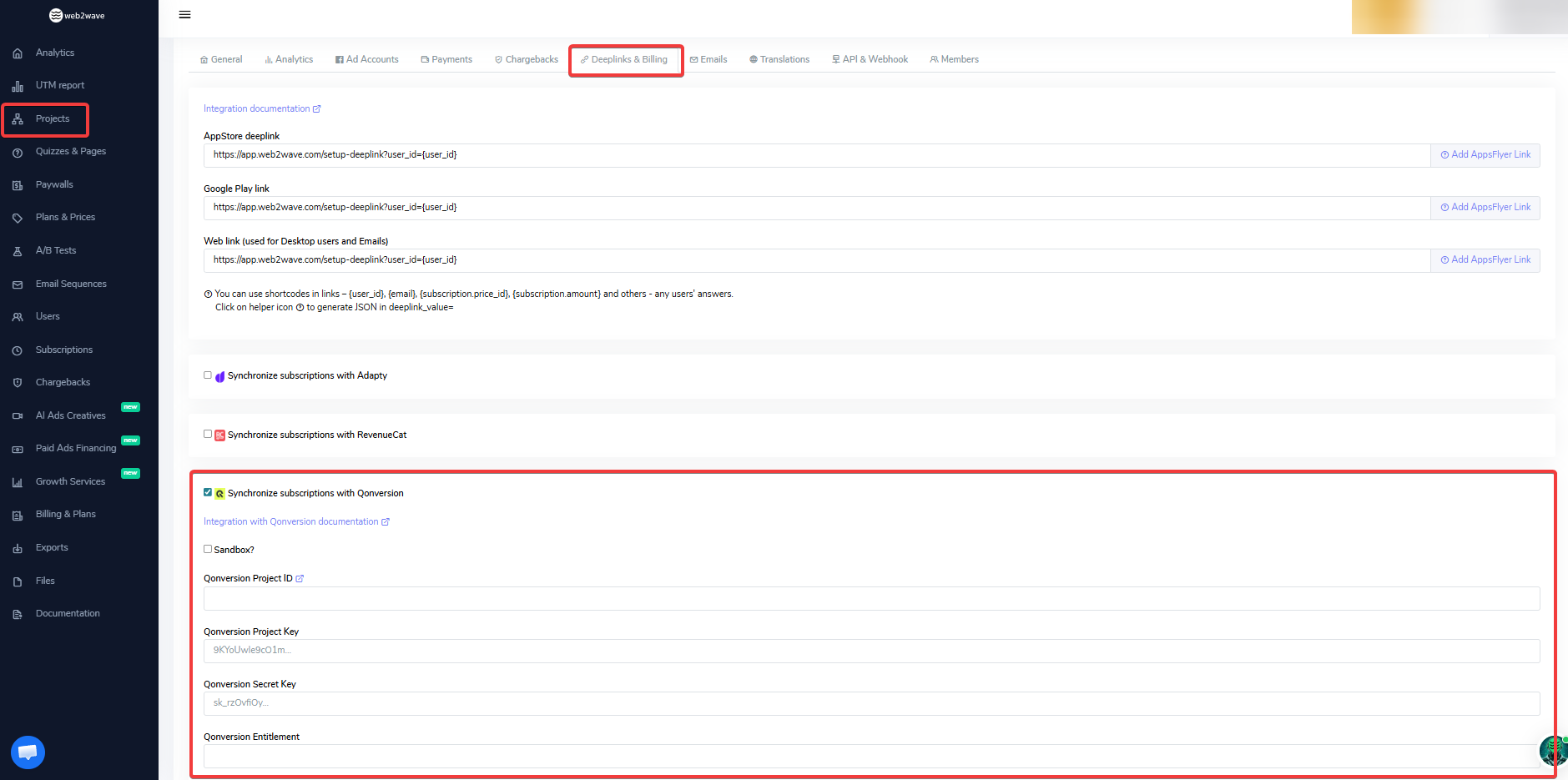
Step 1. Add required info from Qonversion to web2wave project settings
- Adapty API keys (for both platforms separately)
- Access level to grant to the user with subscription
- Optionally – which User Answers/Properties to pass to Adapty
Step 2. Add your deeplink
- Go to Deeplink tab
- Click on help icon on the right to the field to launch Helper
- Add base deeplink
- Add user properties you want to include
- Usually just user_id
- Final link will be inserted
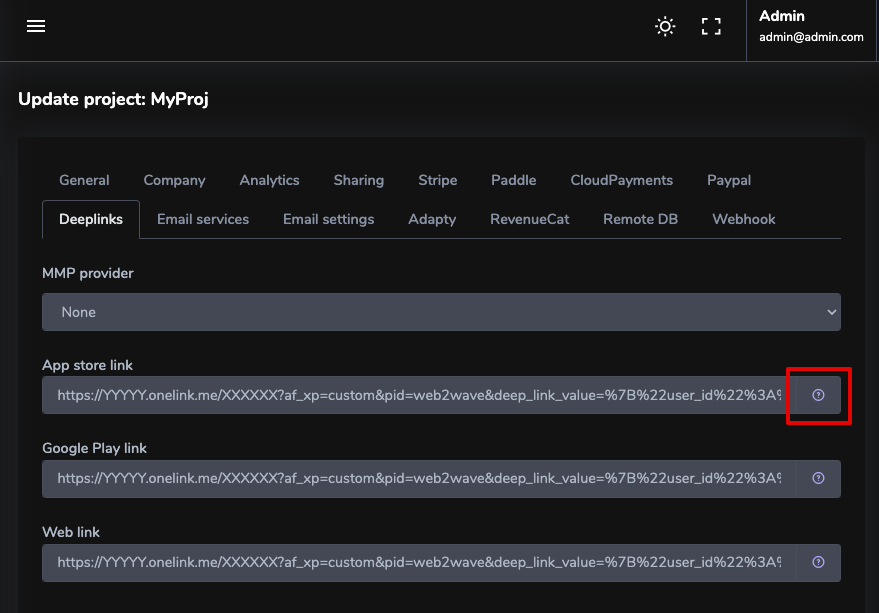
After the purchase of a subscription on web, user will get this deeplink to install the app.
Step 3. Resolve user_id and send Qonversion Profile ID to web2wave
user_id and send Qonversion Profile ID to web2waveIf you use an MMP (AppsFlyer, Adjust, …) — read user_id from the deeplink as shown below.
If you do not use an MMP — call identify() instead. See web2wave deferred deeplinks.
AppsFlyer example
- Read deeplink_value, extract user_id from JSON
- Get Adapty Profile ID
- Send it to web2wave API with web2wave's user_id from deeplink
- API endpoint: https://web2-tfsv.readme.io/reference/post_user-properties
- iOS SDK – https://github.com/web2wave/web2wave_swift
- Flutter SDK – https://github.com/web2wave/web2wave_flutter
- Kotlin SDK – https://github.com/web2wave/web2wave_kotlin
- Java SDK – https://github.com/web2wave/web2wave_java
Add the following to your Package.swift file:

dependencies: [
    .package(url: "https://github.com/web2wave/web2wave_swift.git", from: "1.0.0")
]

import UIKit
import AppsFlyerLib
import Adapty
import Web2Wave

class ViewController: UIViewController, DeepLinkDelegate {
    var userId: String?

    override func viewDidLoad() {
        super.viewDidLoad()
        Adapty.activate("your_adapty_public_sdk_key")
        AppsFlyerLib.shared().deepLinkDelegate = self
        AppsFlyerLib.shared().start()
    }

    func didResolveDeepLink(_ result: DeepLinkResult) {
        guard case .found = result.status, let deepLink = result.deepLink else { return }
        handleDeepLink(deepLink: deepLink)
    }

    private func handleDeepLink(deepLink: DeepLink) {
        guard let deepLinkValue = deepLink["deep_link_value"] as? String,
              let data = deepLinkValue.data(using: .utf8),
              let json = try? JSONSerialization.jsonObject(with: data) as? [String: Any],
              let extractedUserId = json["user_id"] as? String else { return }

        self.userId = extractedUserId
        fetchAdaptyProfileID()
    }

    private func fetchAdaptyProfileID() {
        Adapty.getProfile { [weak self] profile, error in
            guard let self = self, let adaptyProfileID = profile?.profileId, let userId = self.userId else { return }
            self.sendProfileIDToWeb2Wave(userId: userId, adaptyProfileID: adaptyProfileID)
        }
    }

    private func sendProfileIDToWeb2Wave(userId: String, adaptyProfileID: String) async {
        if case .failure(let error) = await Web2Wave.shared.setAdaptyProfileID(appUserID: userId, adaptyProfileID: adaptyProfileID) {
            print("Error sending Adapty profile ID: \(error)")
        }
    }
}
import android.os.Bundle
import androidx.appcompat.app.AppCompatActivity
import com.appsflyer.AppsFlyerLib
import com.appsflyer.deeplink.DeepLinkListener
import com.appsflyer.deeplink.DeepLinkResult
import com.adapty.Adapty
import com.adapty.errors.AdaptyError
import com.adapty.models.Profile
import okhttp3.*
import org.json.JSONObject
import java.io.IOException

class MainActivity : AppCompatActivity() {

    private val client = OkHttpClient()
    private var userId: String? = null

    override fun onCreate(savedInstanceState: Bundle?) {
        super.onCreate(savedInstanceState)
        setContentView(R.layout.activity_main)

        // Initialize Adapty
        Adapty.activate(this, "your_adapty_public_sdk_key") // Replace with your Adapty SDK key

        // Start AppsFlyer SDK
        AppsFlyerLib.getInstance().start(this)
        AppsFlyerLib.getInstance().subscribeForDeepLink(object : DeepLinkListener {
            override fun onDeepLinking(result: DeepLinkResult) {
                when (result.status) {
                    DeepLinkResult.Status.FOUND -> {
                        val deepLink = result.deepLink
                        deepLink?.let { handleDeepLink(it) }
                    }
                    DeepLinkResult.Status.NOT_FOUND -> {
                        println("Deep link not found")
                    }
                    DeepLinkResult.Status.ERROR -> {
                        println("Error resolving deep link: ${result.error?.message}")
                    }
                }
            }
        })
    }

    private fun handleDeepLink(deepLink: DeepLinkResult.DeepLink) {
        val pid = deepLink.clickEvent["pid"] as? String
        if (pid == "web2wave") {
            val deepLinkValue = deepLink.clickEvent["deep_link_value"] as? String
            deepLinkValue?.let {
                // Parse deep_link_value to extract user_id
                val jsonObject = JSONObject(deepLinkValue)
                userId = jsonObject.optString("user_id", "")
                if (!userId.isNullOrEmpty()) {
                    println("User ID from deep link: $userId")
                    // Fetch Adapty Profile ID
                    fetchAdaptyProfileID()
                } else {
                    println("Failed to extract user_id from deep_link_value")
                }
            }
        }
    }

    private fun fetchAdaptyProfileID() {
        Adapty.getProfile(object : (Profile?, AdaptyError?) -> Unit {
            override fun invoke(profile: Profile?, error: AdaptyError?) {
                if (error != null) {
                    println("Failed to fetch Adapty profile: ${error.message}")
                    return
                }

                profile?.let {
                    val adaptyProfileID = it.profileId
                    println("Adapty Profile ID: $adaptyProfileID")

                    // Send Adapty Profile ID to external API
                    userId?.let { userId ->
                        sendAdaptyProfileIDToAPI(userId, adaptyProfileID)
                    }
                }
            }
        })
    }

    private fun sendAdaptyProfileIDToAPI(userId: String, adaptyProfileID: String) {
        val url = "https://quiz.yourdomain.com/api/user/properties"
        val jsonBody = JSONObject()
        jsonBody.put("property", "adapty_profile_id")
        jsonBody.put("value", adaptyProfileID)
        jsonBody.put("user", userId)

        val body = RequestBody.create(MediaType.get("application/json; charset=utf-8"), jsonBody.toString())
        val request = Request.Builder()
            .url(url)
            .addHeader("api-key", "4c54fde2-3e09-XXXXXXXXX") // Replace with your actual API key
            .post(body)
            .build()

        client.newCall(request).enqueue(object : Callback {
            override fun onFailure(call: Call, e: IOException) {
                println("Failed to send data to external API: ${e.message}")
            }

            override fun onResponse(call: Call, response: Response) {
                if (response.isSuccessful) {
                    println("Successfully sent data to web2wave API")
                } else {
                    println("Error sending data to web2wave API: ${response.message}")
                }
            }
        })
    }
}
import 'package:flutter/material.dart';
import 'package:appsflyer_sdk/appsflyer_sdk.dart';
import 'package:adapty_flutter/adapty_flutter.dart';
import 'package:web2wave/web2wave.dart';
import 'dart:convert';

class HomePage extends StatefulWidget {
  @override
  _HomePageState createState() => _HomePageState();
}

class _HomePageState extends State<HomePage> {
  String? userId;
  late AppsFlyerSdk _appsflyerSdk;

  @override
  void initState() {
    super.initState();
    Web2Wave.shared.initialize(apiKey: 'your-api-key');
    Adapty().activatePublicSdkKey('your_adapty_public_sdk_key');

    _appsflyerSdk = AppsFlyerSdk(
      AppsFlyerOptions(afDevKey: 'your_apps_flyer_dev_key', appId: 'your_app_id', showDebug: true),
    )..onDeepLink((deepLinkData) => _handleDeepLink(deepLinkData))
     ..startSDK();
  }

  void _handleDeepLink(Map<String, dynamic> deepLink) async {
    final deepLinkValue = deepLink['deep_link_value'];
    if (deepLinkValue is String) {
      try {
        final extractedUserId = jsonDecode(deepLinkValue)['user_id'];
        if (extractedUserId is String) {
          setState(() => userId = extractedUserId);
          final profile = await Adapty().getProfile();
          if (profile?.profileId != null) {
            await Web2Wave.shared.setAdaptyProfileID(userId: extractedUserId, adaptyProfileId: profile!.profileId!);
          }
        }
      } catch (e) {
        print('Error parsing deep link JSON: $e');
      }
    }
  }

  @override
  Widget build(BuildContext context) {
    return Scaffold(
      appBar: AppBar(title: Text('Web2Wave Integration')),
      body: Center(
        child: Text(userId != null ? 'User ID: $userId' : 'Waiting for deep link...'),
      ),
    );
  }
}
Restore purchases in 1-2 seconds: https://adapty.io/docs/restore-purchase
Adapty.restorePurchases { [weak self] result in
    switch result {
        case let .success(profile):
            if info.profile.accessLevels["YOUR_ACCESS_LEVEL"]?.isActive ?? false {
                // successful access restore
            }
        case let .failure(error):
            // handle the error
    }
}
Adapty.restorePurchases { result ->
    when (result) {
        is AdaptyResult.Success -> {
            val profile = result.value

            if (profile.accessLevels["YOUR_ACCESS_LEVEL"]?.isActive == true) {
            // successful access restore
            }
        }
        is AdaptyResult.Error -> {
            val error = result.error
            // handle the error
        }
    }
}
Step 4. The entitlement will be granted to the user on Adapty
All subscription changes – pauses, cancellations, will be reflected on the user later.
Step 5. Purchases Restore after app reinstall
Adapty creates a new Profile every time the app is reinstalled. This means that whenever a user deletes and reinstalls the app, they will receive a new Adapty Profile ID, causing their subscription to reset.
https://adapty.io/docs/profiles-crm#profile-record-creation
🔧 How to Fix This
To prevent subscription resets and ensure continuity, you need to assign a persistentcustomerUserId when the app launches. This ensures that Adapty recognizes returning users even after they reinstall the app.
✅ Steps to Implement:
-
Generate a Persistent User Identifier
- Use an external identifier such as an email, phone number, or authentication ID from your backend.
- Alternatively, generate a unique ID and store it securely to persist across reinstalls.
-
Store the Identifier on Device
- iOS (Swift): Use Keychain instead of
UserDefaults, asUserDefaultsis cleared upon uninstallation. - Android (Kotlin): Use EncryptedSharedPreferences or Google Account Backup.
- Flutter: Use secure_storage or an equivalent method.
- React Native: Use AsyncStorage or react-native-keychain.
- iOS (Swift): Use Keychain instead of
-
Pass
customerUserIdto Adapty on App LaunchAdapty.identify(customerUserId: storedUserId) { error in if let error = error { print("Adapty identification error: \(error.localizedDescription)") } }
This ensures that the same Adapty Profile ID is used, even if the app is reinstalled.
Sync with Your Backend (Optional) If your app has a backend, store the user’s Adapty profile ID and map it to their account. This allows restoring the subscription from the backend if needed.