
1. Authorization Rate
Authorization Rate, also called Approval Rate, is the percentage of authorization attempts approved by the cardholder’s bank, also known as the issuer.
Authorization Rate = Approved authorizations / All authorization attempts × 100%
Authorization Rate measures the success of bank authorizations, while Payment Success Rate reflects the outcome of the entire payment process.
Where to find it in Stripe
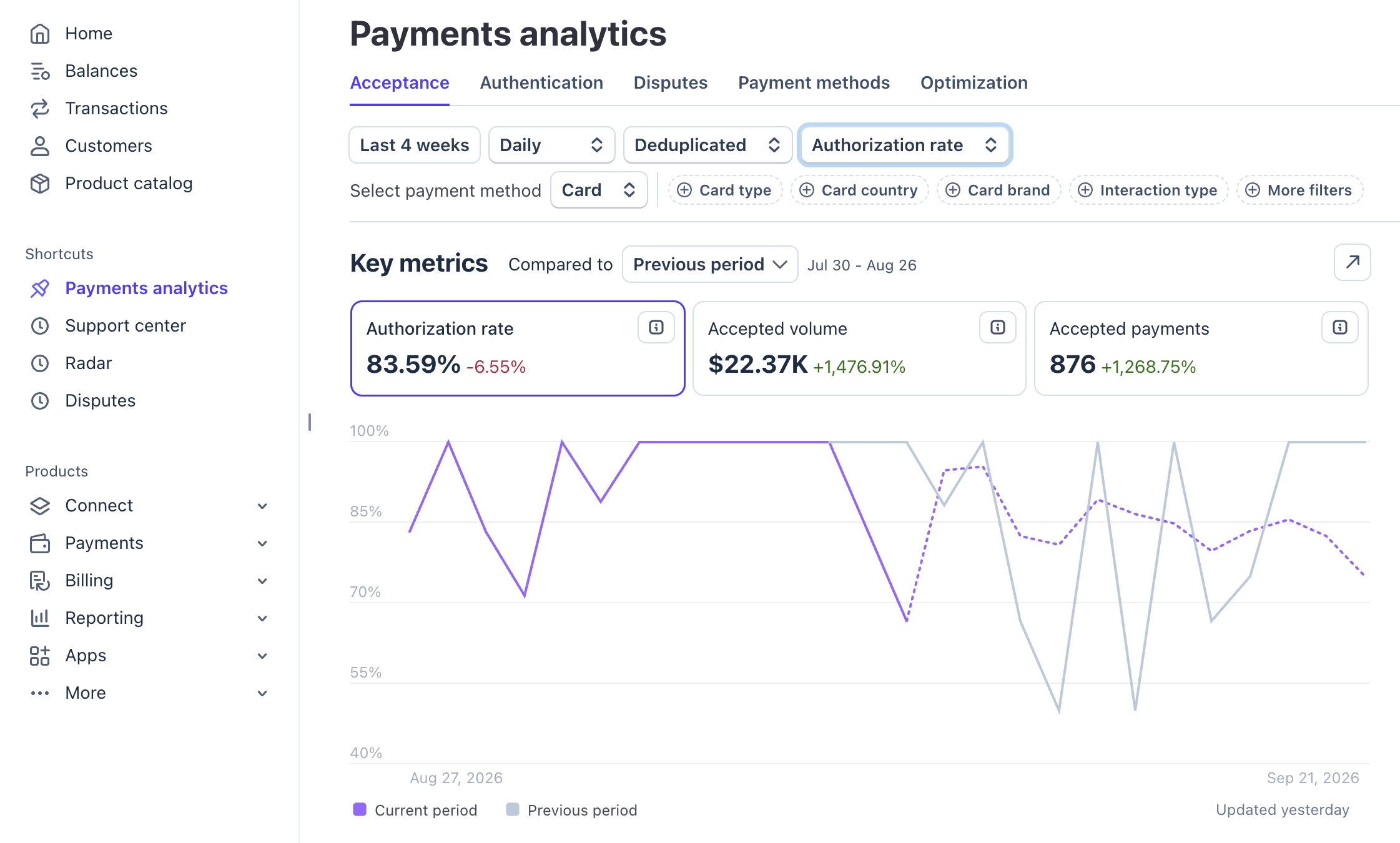
Go to Payments analytics → Acceptance, select your date range, then choose Authorization rate from the metric dropdown.
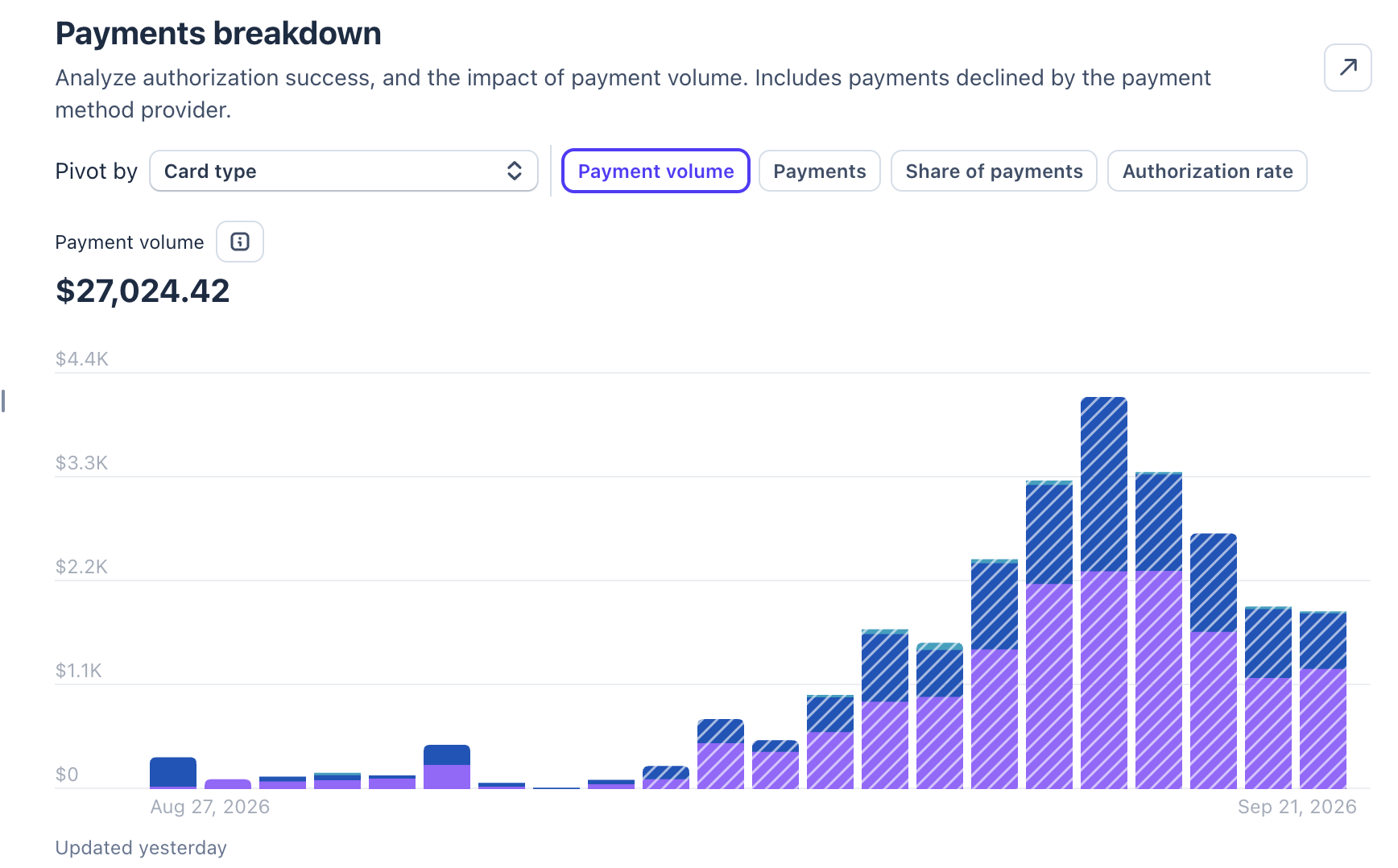
Further down the page, you’ll find Payments breakdown, where you can analyze authorization success and the impact of payment volume, including payments declined by the payment method provider.
Issuer declines
Common decline codes include do_not_honor, insufficient_funds and generic_decline.
A sharp increase in insufficient_funds may indicate problems with audience quality or recurring payments.
If do_not_honor increases, analyze geography, BIN, issuer, merchant category code (MCC), transaction amount and CIT/MIT. This code does not provide a specific reason for the decline.
For generic_decline, check the payment outcome to determine whether the decline came from the issuer or from Stripe’s payment controls.
Issuer fraud controls
Each issuer uses its own risk models.
For example, a customer usually makes purchases of €20–50 in Finland. A sudden online transaction for $150 with a foreign merchant may appear unusual to their bank.
Card and merchant geography
Approval Rate can depend on the relationship between:
- The customer’s country.
- The card’s country.
- The country of the Stripe account or acquiring bank.
For example, US customer + US card + US acquiring is typically a more natural payment route than US customer + US card + EU merchant or acquiring.
The second route may be treated as a cross-border transaction.
Cross-border payments are not necessarily declined. However, approval rates may be lower for certain issuers, BINs or business types.
BIN and issuer
The BIN, or Bank Identification Number, is the first part of the card number. It helps identify the issuing bank, country, card type and other characteristics.
The issuer is the bank that issued the customer’s card.
Some issuers may apply stricter controls to:
- Subscription businesses.
- Cross-border transactions.
- Certain merchant category codes.
- Recurring payments.
- Transactions of particular amounts.
- Specific merchants.
Customer-initiated and merchant-initiated transactions
CIT: Customer-Initiated Transaction
The customer actively starts the payment and can complete 3D Secure (3DS) authentication when required.
This gives the issuer more evidence that the payment is legitimate and may reduce its perceived risk.
MIT: Merchant-Initiated Transaction
The merchant initiates the charge without the customer’s active involvement, as with many recurring subscription payments. The customer cannot complete an interactive 3DS challenge during that unattended charge.
The issuer therefore relies more heavily on previous payment history, accurate recurring-payment data and its own risk model.
Analyze CIT and MIT separately because their decline patterns and underlying causes can differ.
2. Payment Success Rate
Payment Success Rate is the percentage of all payment attempts that ultimately complete successfully.
Payment Success Rate = Successful payments / All payment attempts × 100%
Payment Success Rate is broader than Approval Rate. It covers the entire process from the initial payment attempt to successful completion.
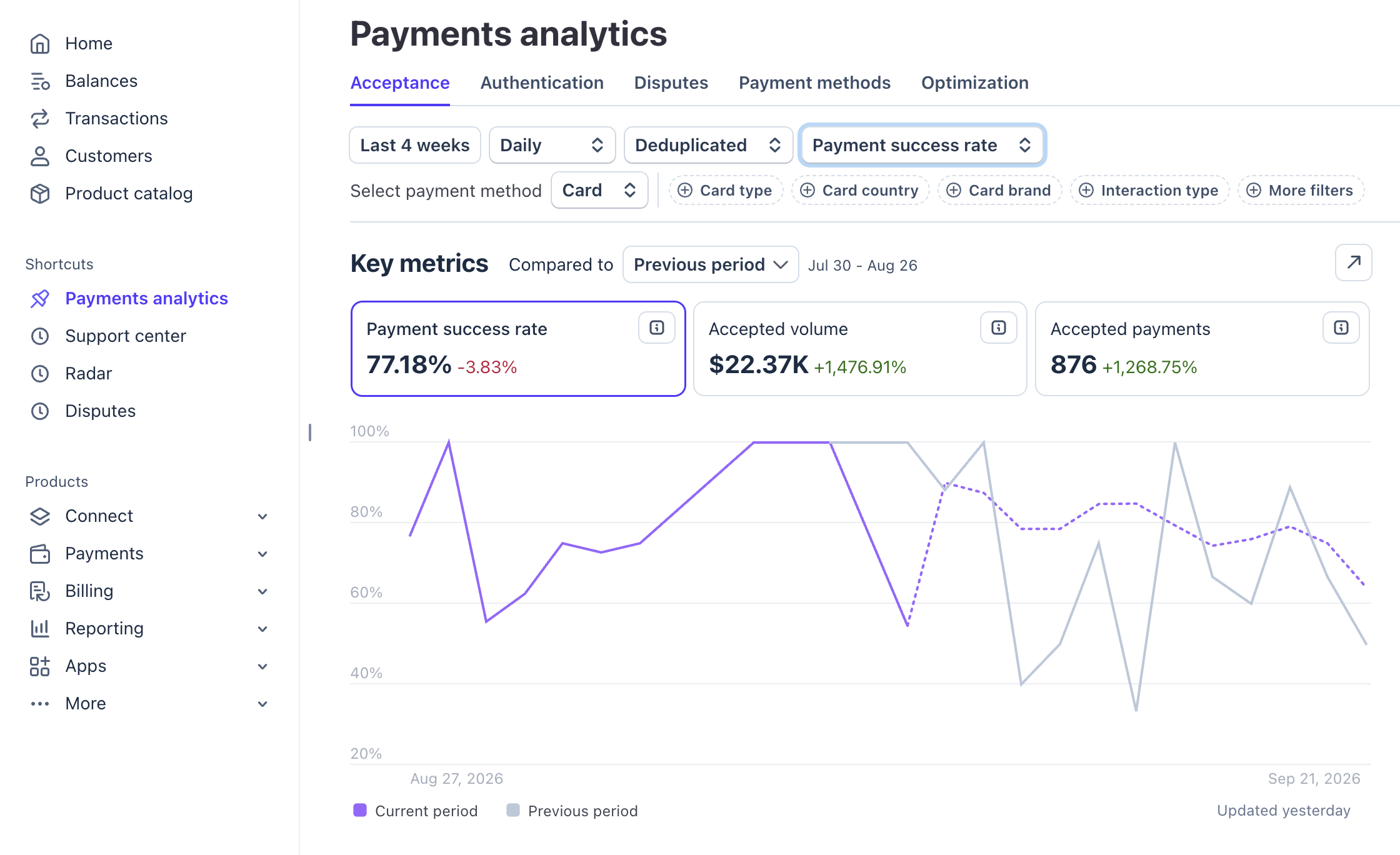
Go to Payments analytics → Acceptance, select your date range, then choose Payment success rate from the dropdown highlighted in blue in the screenshot.
Example
Out of 1,000 payment attempts:
- 900 reach authorization.
- 810 receive issuer approval.
- 800 complete successfully.
Approval Rate = 810 / 900 × 100% = 90%
Payment Success Rate = 800 / 1,000 × 100% = 80%
Issuer approval
More issuer declines generally reduce both Approval Rate and Payment Success Rate.
Examples include increases in do_not_honor and insufficient_funds. For generic_decline, check whether the payment was declined by the issuer or blocked by Stripe.
3DS and authentication
A customer may fail to complete authentication because they:
- Close the authentication page.
- Do not approve the payment in their banking app.
- Enter an incorrect verification code.
- Abandon the process.
The payment may therefore fail even when there is no direct issuer decline.
Stripe Radar and fraud blocks
Stripe Radar can identify a payment as high risk and block it.
A blocked payment does not complete successfully, which reduces Payment Success Rate.
Technical errors
Integration issues, API errors, PaymentIntent errors or problems with checkout or the payment service provider (PSP) can prevent a payment from completing.
These failures may be unrelated to the customer’s bank.
Customer behavior
A customer may start checkout but leave before paying, abandon authentication or decide not to complete the purchase.
Whether these events reduce Payment Success Rate depends on how your analytics define a payment attempt. Use a consistent definition when comparing results.
3. Failed Payments
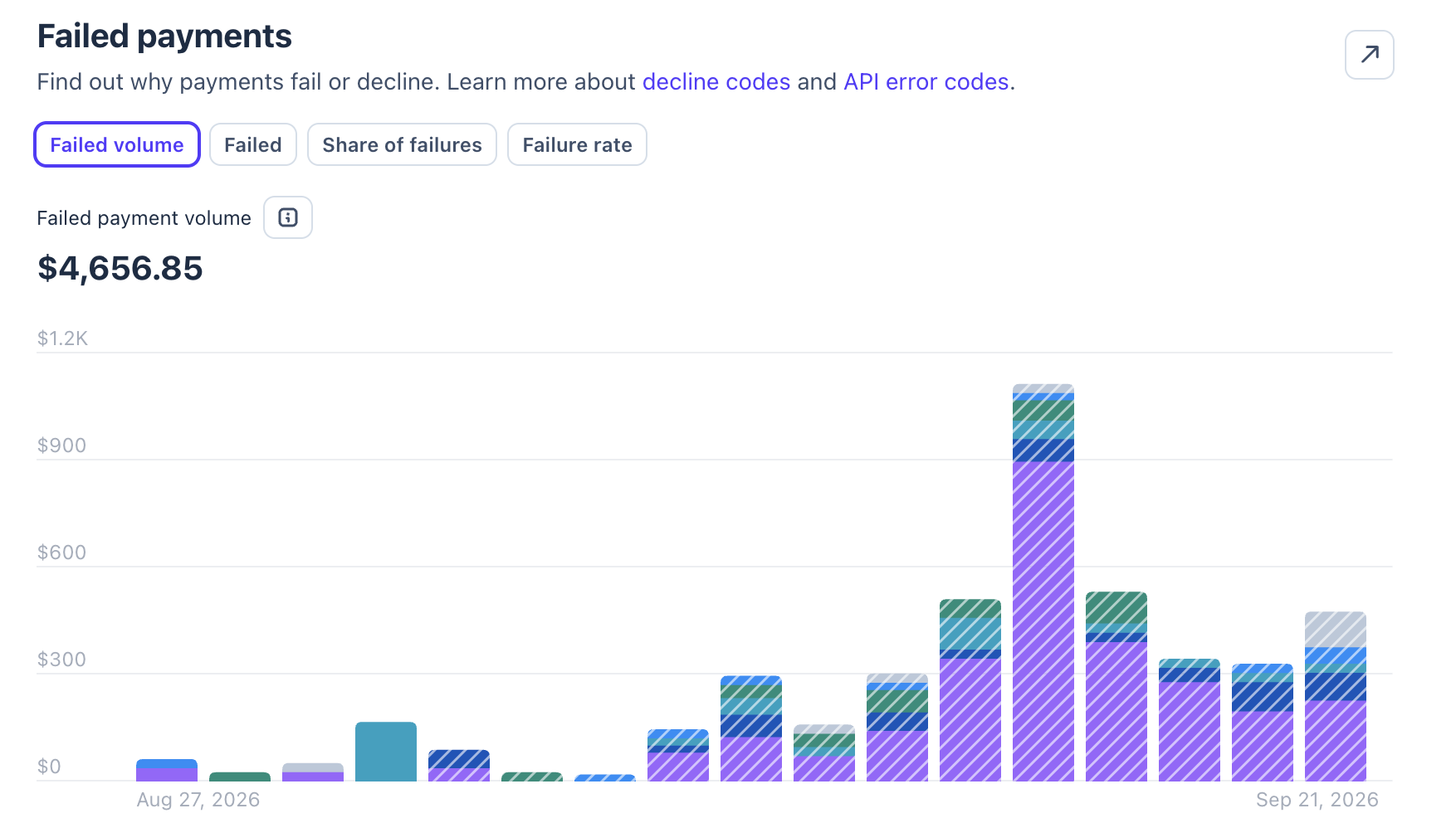
The Failed payments section in Stripe shows why payments fail or are declined. Failures can include issuer declines, Stripe fraud-control blocks and technical errors.
Where to find it in Stripe
Go to Payments analytics → Acceptance, select your date range, and scroll down to Failed payments.
Review the failure reasons and decline codes to identify the most common issues. Compare results over time and use available filters to investigate affected customer segments.
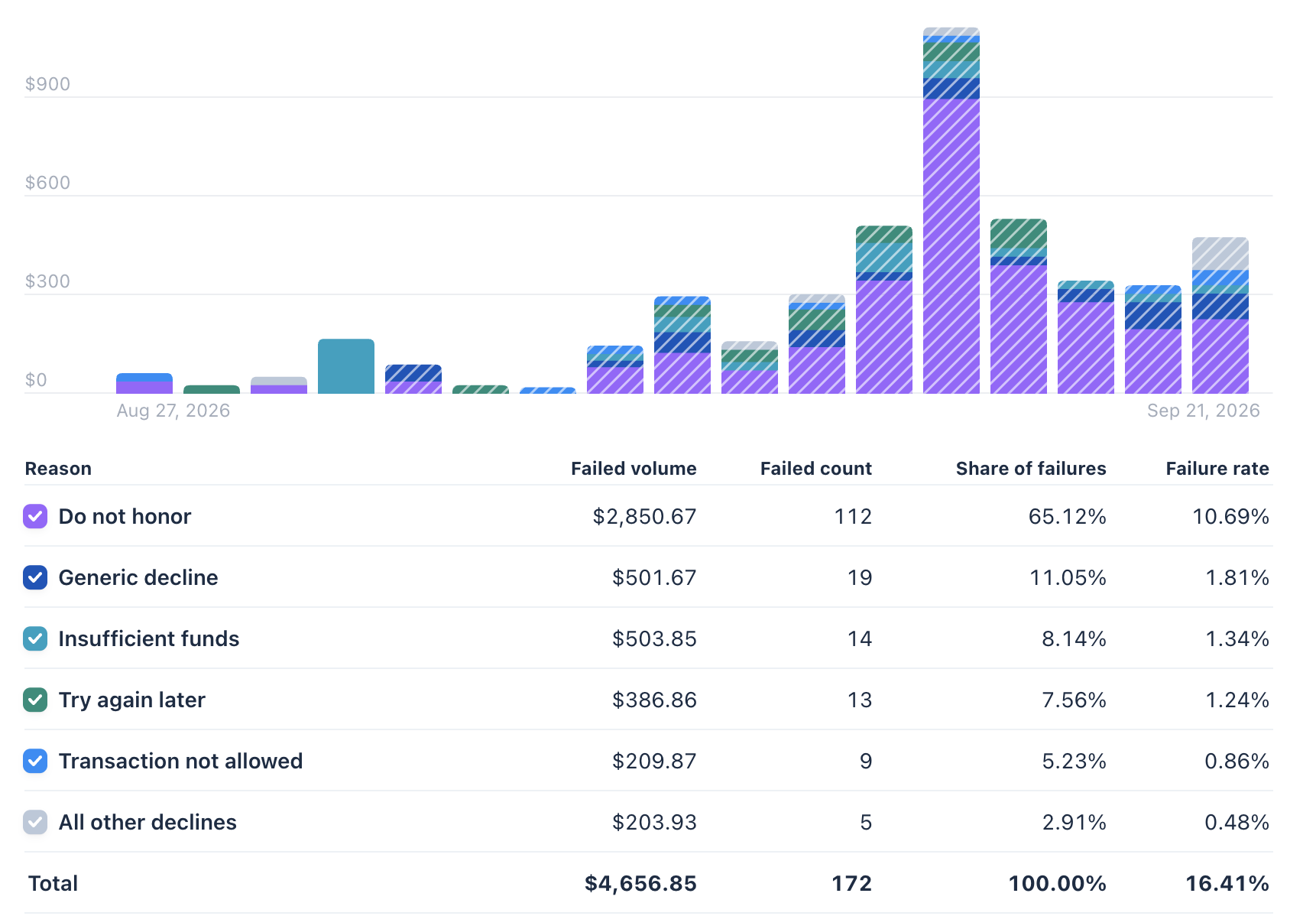
Common decline codes
insufficient_funds: The card has insufficient funds.do_not_honor: The issuer declined the payment without providing a specific reason.generic_decline: A generic decline that may also reflect a block by Stripe Radar or Adaptive Acceptance.expired_card: The card has expired.incorrect_cvc: The card security code is incorrect.card_velocity_exceeded: The customer has exceeded the balance, credit limit or transaction amount limit available on the card.
Interpreting changes in decline patterns
A sharp increase in insufficient_funds, especially for MIT, may indicate problems with recurring collections.
An increase in do_not_honor requires deeper analysis because the issuer does not provide a precise explanation. Compare:
- Geography.
- BIN and issuer.
- CIT versus MIT.
- Transaction amount.
- Merchant category code.
Declines on recurring payments
Analyze customer-initiated and merchant-initiated payments separately.
MIT can have a higher Failed Rate because:
- The customer is not actively participating in the payment.
- The card may have insufficient funds.
- The card may have been replaced or blocked.
- The issuer may apply stricter controls to recurring transactions.
4. Fraud Rate and Stripe Radar
Where to find it in Stripe
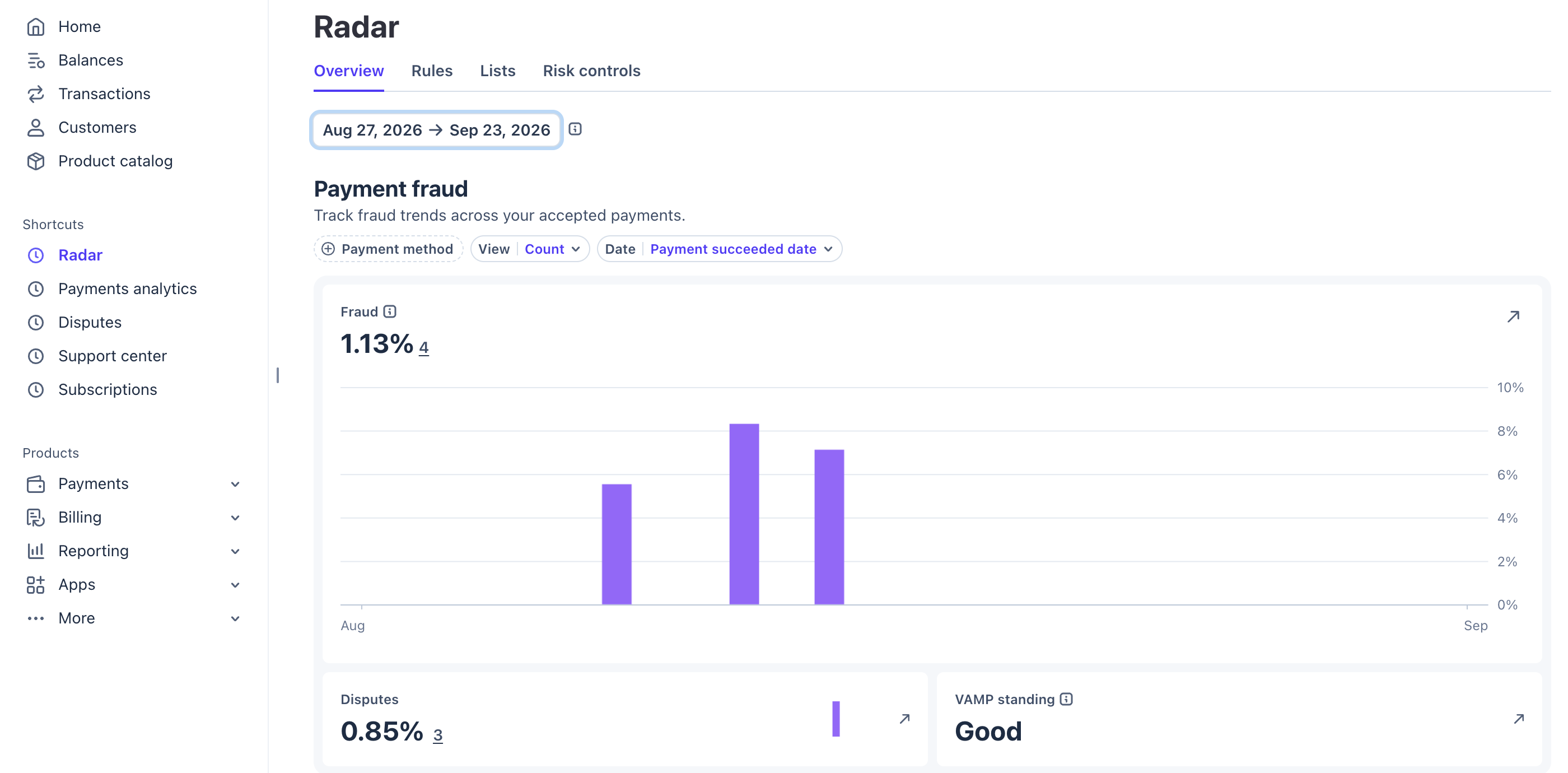
Go to Radar → Overview, select your date range, and review the Fraud metric. It shows the share of successful payments that result in a fraudulent dispute or an Early Fraud Warning (EFW).
Important: This rate can change over time. As Stripe notes, customers have up to 120 days to dispute a charge, so recent periods may not yet reflect all fraud reports.
Traffic quality
Fraud rates can vary significantly by traffic source, geography and audience.
If fraud increases after a new traffic source launches, compare results by source, campaign, geography and BIN, where those data are available.
Geography, BIN and issuer
Some countries, issuers or BIN ranges may account for a disproportionate share of fraudulent transactions.
Look beyond the overall Fraud Rate and compare:
- Geography.
- BIN.
- Issuer.
- Traffic source.
- Product.
Radar settings
More permissive rules may allow more payments to proceed and improve conversion. However, they may also allow more potentially fraudulent transactions through.
Stricter rules may reduce fraud but increase false positives, where legitimate customers are incorrectly blocked. This can reduce Payment Success Rate.
The objective is to balance conversion and risk.
Where to manage Radar rules
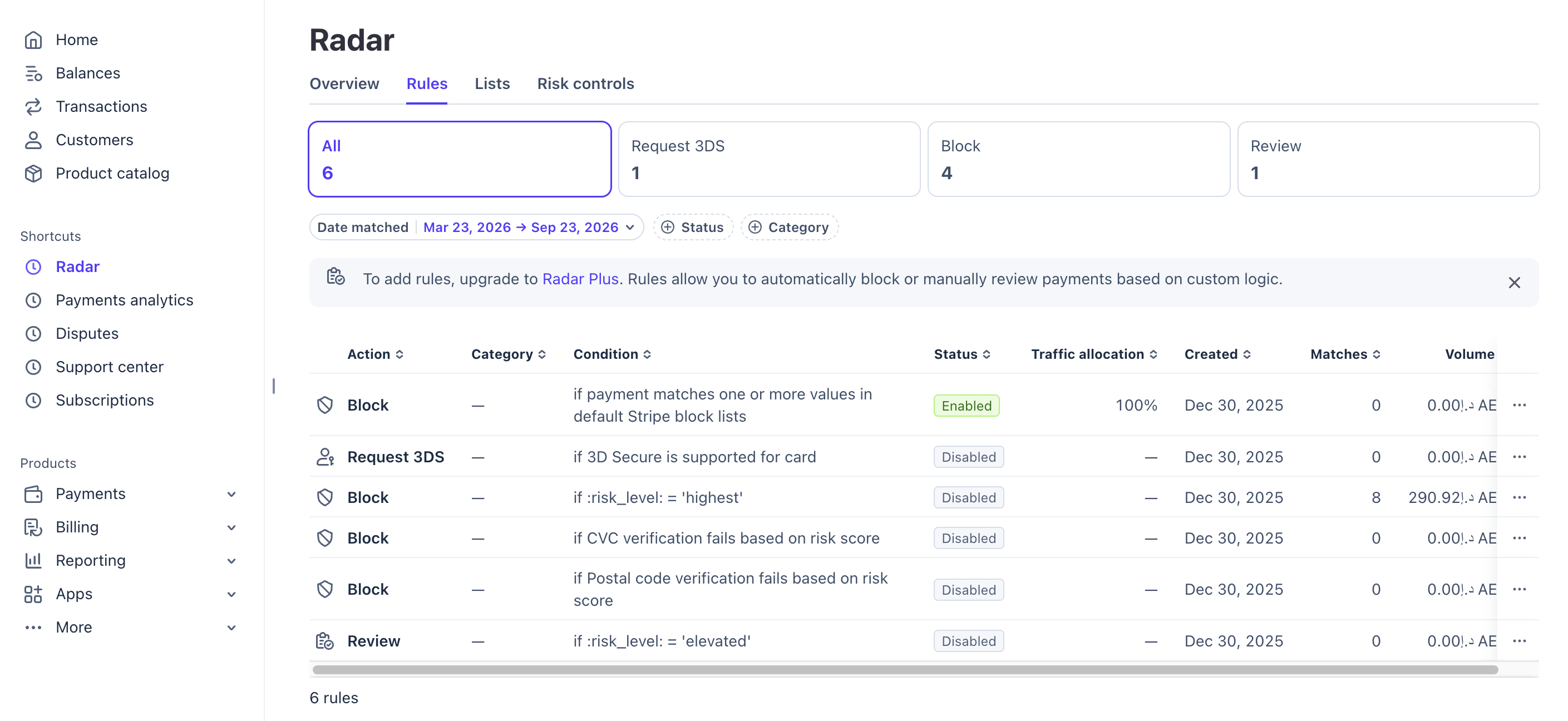
Go to Radar → Rules to review and manage your fraud prevention rules.
If your Radar plan supports custom rules, you can create conditions to block payments, allow payments, request 3D Secure or send payments for review.
Learn more in Stripe’s guide to Radar rules.
5. Dispute Rate and Early Fraud Warnings
Dispute Rate measures disputes relative to accepted payments. The displayed rate depends on the selected calculation settings, including whether Early Fraud Warnings are included.
Where to find it in Stripe
Go to Payments analytics → Disputes, select your date range, and choose Card as the payment method.
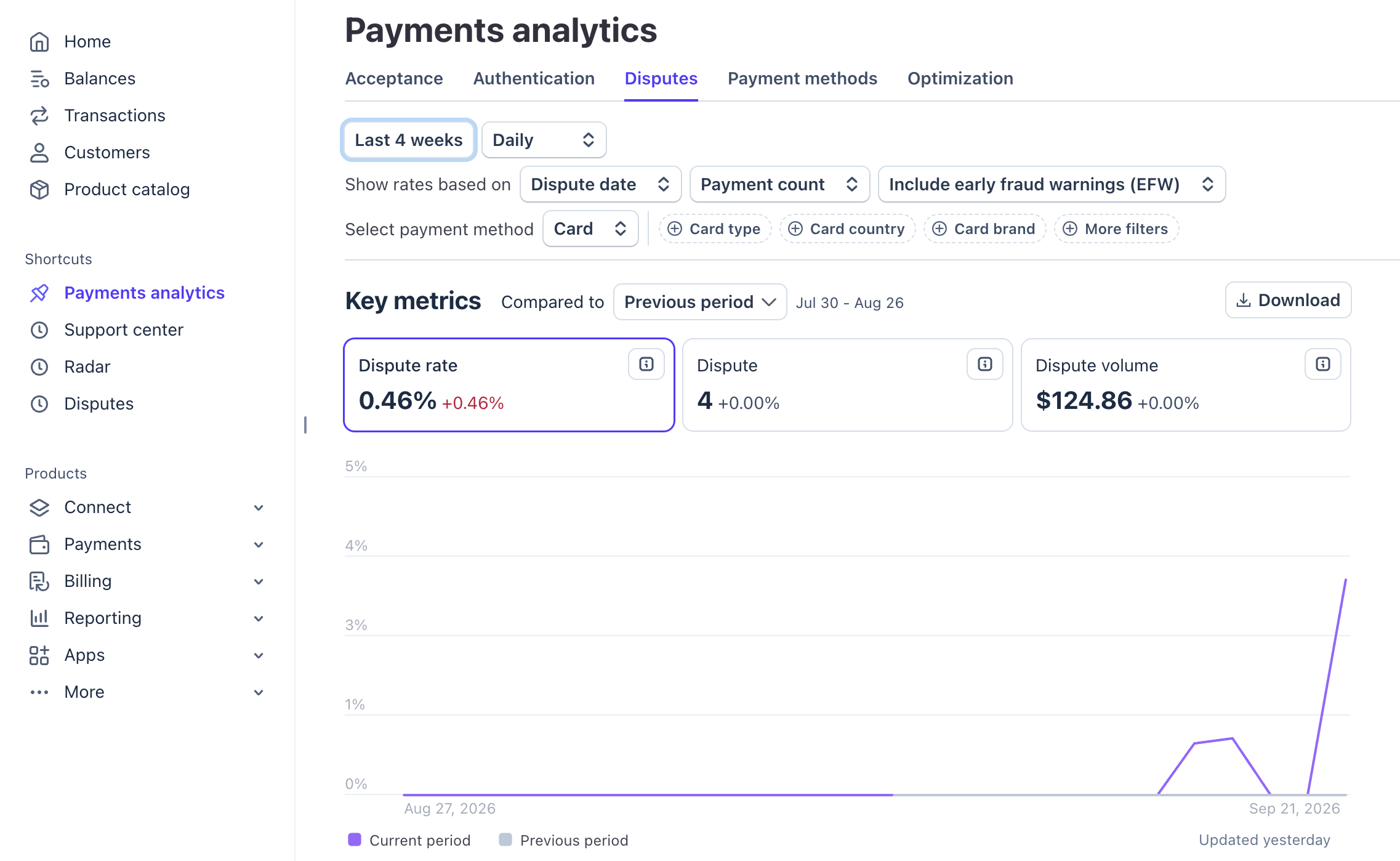
Under Key metrics, review Dispute rate, the dispute count and Dispute volume.
What the rate includes
Dispute Rate covers disputes for both fraud and non-fraud reasons. The EFW setting also affects the calculation: select Don’t include early fraud warnings to examine disputes alone, or Include early fraud warnings (EFW) to include those warnings.
If an EFW becomes a dispute, Stripe counts it as a dispute rather than a separate EFW.
The card analytics view excludes inquiries, hidden disputes handled automatically by Stripe, and disputes prevented through mechanisms such as Rapid Dispute Resolution.
Date and calculation settings
- Dispute date: Groups activity by when the dispute was created.
- Payment date: Associates disputes with the original payment date. Recent periods can change as disputes arrive later.
- Payment count: Uses transaction counts rather than monetary volume.
Keep these settings consistent when comparing periods.
Common reasons for disputes
Fraud and unrecognized charges
A cardholder may report a payment they did not authorize. Customers may also dispute legitimate purchases if they forget a subscription or fail to recognize the statement descriptor.
Subscriptions and cancellation
Unclear trial terms, unexpected renewals and difficulty canceling can lead to disputes.
Product or service issues
Customers may dispute a charge because they did not receive the product or service, or because it did not match their expectations.
Early Fraud Warnings
An Early Fraud Warning (EFW) indicates that the card issuer has flagged a payment as potentially fraudulent. It is not itself a chargeback and does not necessarily become a dispute. Stripe’s EFW reference
When disputes or EFW increase, investigate the affected geography, products and customer groups. Compare traffic sources and campaigns where your analytics provide that information.