
The Payment Terms block is a dynamic content component that displays subscription pricing information and terms. It automatically updates based on the selected pricing plan and uses data attributes to populate content and control visibility.
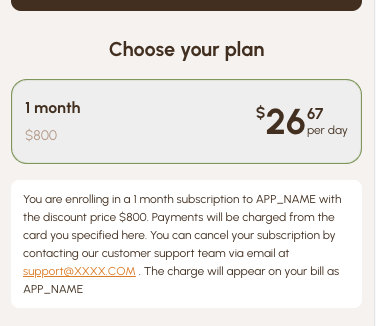
How It Works
- This block (and technically any other block on Paywall) contains HTML code that can be used to show properties of a selected Price
- The content is updated when the user selects a price
- It shows/hides content conditionally based on whether values exist
You can define multiple payment terms by adding several identical blocks with different content and linking each one to a specific price. When a user selects a price, the corresponding terms will be displayed.
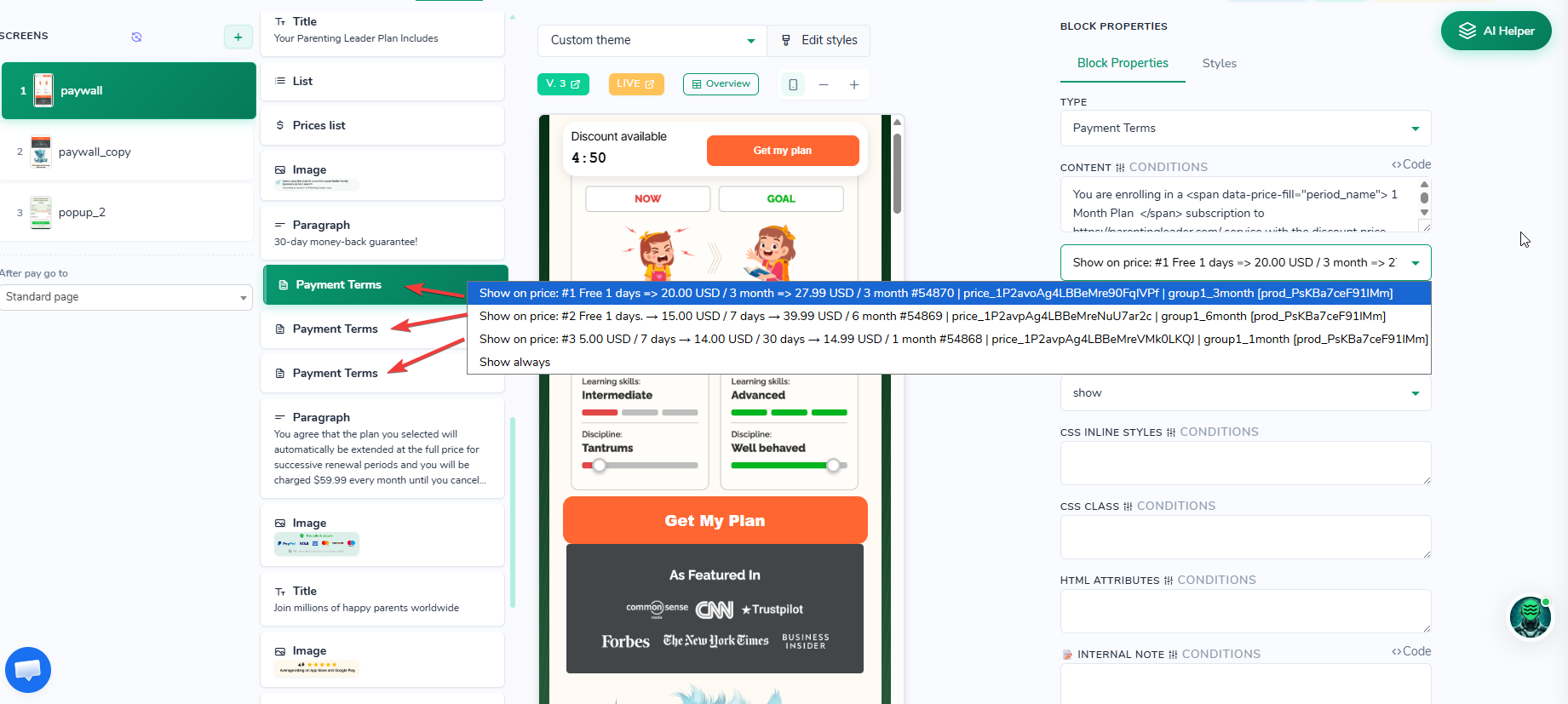
Illustration how to link Various Payment Terms blocks to different prices
HTML elements Data Attributes
data-price-fill="property" – Fill this element with Price property
data-price-fill="property" – Fill this element with Price propertyPopulates the element's HTML content with the specified property value.
<span data-price-fill="priceCurrentCurrency">$9.99</span>
<span data-price-fill="period_name">month</span>data-price-fill-toggle="property"– Show this element only if property has value
data-price-fill-toggle="property"– Show this element only if property has valueShows the element only if the property has a value (truthy).
<span data-price-fill-toggle="freePeriodDescr">
  You have a <span data-price-fill="freePeriodDescr">7 days free</span> trial
</span>data-price-fill-toggle-not="property"– Hide this element only if property has value
data-price-fill-toggle-not="property"– Hide this element only if property has valueShows the element only if the property has no value (falsy).
<span data-price-fill-toggle-not="freePeriodDescr">
  No free trial available
</span>
Available Properties
These properties are filled into [data-price-fill] elements when the user selects a price. Values use the active currency (auto-detected or the price’s primary currency). Empty values hide both the fill element and any data-price-fill-toggle wrapper.
Price amounts
| Property | Description | Example values |
|---|---|---|
priceCurrent | Amount the user is charged now, without a currency symbol. 0 during a free trial. | 9.99, 0 |
priceCurrentCurrency | Same amount with the currency symbol. | $9.99, €0, £8.99 |
priceOldNum | Regular (“was”) amount without a currency symbol. 0 when there is no discount. | 19.99, 0 |
priceOld | Regular price with the currency symbol. Empty when there is no discount. | $19.99, "" |
priceBase | Full recurring price of the plan (not the intro or trial amount), with the currency symbol. | $9.99 |
pricePeriodDescr | Amount of the current charge, or One-time payment for prices without a billing period. | $9.99, One-time payment |
Comparison (per day / week / month / year)
The comparison period comes from the paywall comparison period setting. Typical use: show a yearly plan as “just $X per month”.
| Property | Description | Example values |
|---|---|---|
priceCurrentComparison | Current amount recalculated for the comparison period, without a currency symbol. | 2.50, 29.97 |
priceCurrentComparisonSplit | Same value split into whole part and decimals. | 2 and 50 |
price_old_comparison | Regular (“was”) amount recalculated for the comparison period. Set only when there is a discount. | 4.99 |
price_old_comparison_split | price_old_comparison split into whole part and decimals. | 4 and 99 |
price_old_comparison_currency | price_old_comparison with the currency symbol. | $4.99 |
Discounts and special offers
| Property | Description | Example values |
|---|---|---|
priceDiff | Savings with a leading minus and currency symbol. Empty when there is no discount. | -$10.00, "" |
priceDiffPositive | Same savings without the minus (absolute value + currency). Use this when you want to place - yourself. Empty when there is no discount. | $10.00, "" |
discountPercent | Discount percent, rounded down. For intro offers it is usually a negative number (e.g. -50). 0 hides the fill element. | -50, 50, 0 |
discountPercentNegative | Same percent, always with a minus sign. | -50, -25, 0 |
specialOfferText | Extra offer label. Usually empty. | "" |
price_has_paid_trial | 1 when the price has a paid intro offer; otherwise empty. Use with data-price-fill-toggle. | 1, "" |
Trial and billing period
| Property | Description | Example values |
|---|---|---|
freePeriodDescr | Localized free-trial label. Empty when there is no free trial. | 7 days free, 30 days free, empty |
trialPeriodInDays | Free-trial length in days. Empty when there is no free trial. | 7, 30 |
period_name | Period of the current charge. For a paid intro offer this is the intro length; otherwise the plan period. A 7-day intro is shown as 1 week. | month, 3 months, 1 week |
period_number | Number of periods from the plan period name. Empty when that name contains 1 (so both 1 month and 12 months currently return nothing). Always taken from the plan period, not from the intro offer. | 3, "" |
mainPeriodName | Plan period the user is charged for after the trial or intro offer. | month, year |
next_charge_date | Date of the next charge after the trial or intro offer. | 15 December 2024 |
Currency and plan
| Property | Description | Example values |
|---|---|---|
currency_symbol | Active currency symbol. | $, €, £ |
currency_code | Active currency code (lowercase). | usd, eur |
activeCurrencyCode | Same as currency_code. | usd |
plan | Plan the selected price belongs to. | plan data |
Snake_case aliases
The same values are also exposed under these names (handy in templates that use snake_case):
| Alias | Same as |
|---|---|
price_first_number | priceCurrent |
price_first_currency | priceCurrentCurrency |
price_old_number | priceOldNum |
price_old_currency | priceOld (always with 2 decimals) |
price_main_currency | priceBase |
price_diff | priceDiff |
price_diff_positive | priceDiffPositive |
discount_percent | discountPercent |
discount_percent_negative | discountPercentNegative |
period_description | pricePeriodDescr |
free_trial_period_description | freePeriodDescr |
trial_period_in_days | trialPeriodInDays |
period_first_description | period_name |
period_main_description | mainPeriodName |
special_offer_text | specialOfferText |
Every field of the selected price itself is available too (for example id, amount, amount_real, currency, period, period_interval, discount_percent, trial_free_period_length_in_days).
Paywall price overrides (custom old price, title, checkout discount label) are applied on top of these values before the HTML is filled. Each property is also available with an _original suffix (priceOld_original, …), which holds the value before overrides.
Usage Examples
Basic Payment Terms
<div class="payment-terms">
  <p>
    You will be charged <span data-price-fill="priceCurrentCurrency">$9.99</span>
    every <span data-price-fill="period_name">month</span> until you cancel.
  </p>
</div>
With Free Trial
<div class="payment-terms">
  <p>
    <span data-price-fill-toggle="freePeriodDescr">
      Start your <span data-price-fill="freePeriodDescr">7 days free</span> trial,
      then
    </span>
    <span data-price-fill="priceCurrentCurrency">$9.99</span>
    per <span data-price-fill="period_name">month</span>.
  </p>
</div>
With Discount Information
<div class="payment-terms">
  <p>
    <span data-price-fill-toggle="priceOld">
      <s data-price-fill="priceOld">$19.99</s>
    </span>
    <span data-price-fill="priceCurrentCurrency">$9.99</span>
    <span data-price-fill-toggle="priceDiffPositive">
      (Save <span data-price-fill="priceDiffPositive">$10.00</span>)
    </span>
    per <span data-price-fill="period_name">month</span>
  </p>
</div>
Complete Terms Example
<div class="payment-terms">
  <p>
    Without cancellation,

    <span data-price-fill-toggle="freePeriodDescr">
      before the <span data-price-fill="freePeriodDescr">7 days free</span> trial ends,
    </span>

    <span data-price-fill-toggle-not="freePeriodDescr">
      before the selected discounted intro plan ends,
    </span>

    I accept that the service will automatically charge
    <span data-price-fill="priceCurrentCurrency">$9.99</span>
    every <span data-price-fill="period_name">month</span>
    until I cancel.

    <span data-price-fill-toggle="next_charge_date">
      Next charge: <span data-price-fill="next_charge_date">15 December 2024</span>
    </span>
  </p>
</div>
Comparison Pricing
<div class="payment-terms">
  <p>
    <span data-price-fill="priceCurrentCurrency">$29.99</span> per year
    <span data-price-fill-toggle="priceCurrentComparison">
      (Just <span data-price-fill="currency_symbol">$</span><span data-price-fill="priceCurrentComparison">2.50</span> per month)
    </span>
  </p>
</div>
Positive savings amount (no minus in the value)
priceDiff is already prefixed with -. If you need to control the sign in HTML, use priceDiffPositive:
<div class="payment-terms">
  <p>
    You save <span data-price-fill="priceDiffPositive">$10.00</span>
    (<span data-price-fill="discountPercentNegative">-50</span>%)
  </p>
</div>
Intro / paid trial then regular price
<div class="payment-terms">
  <p>
    Pay <span data-price-fill="priceCurrentCurrency">$29.99</span>
    today, then <span data-price-fill="priceBase">$59.99</span>
    starting <span data-price-fill="next_charge_date">15 December 2024</span>
    per <span data-price-fill="mainPeriodName">month</span>.
  </p>
</div>
Implementation Notes
- Automatic Updates: The content updates automatically when users select different pricing plans.
- Conditional Display: Use toggle attributes to show/hide content based on plan features. Empty values (
"",0) hide[data-price-fill]elements as well — sopriceCurrentof0during a free trial hides that element. PreferpriceCurrentCurrency($0) or wrap trial copy indata-price-fill-toggle="freePeriodDescr". - Localization: Trial and period labels (
7 days free, period names,One-time payment) are localized. - Currency Support: Amounts with a
*Currencysuffix include the active currency symbol (currency_symbol/currency_code). - Trial Handling: Free trials set
freePeriodDescr,trialPeriodInDays,priceCurrentto0, andnext_charge_dateto today + trial days. - Paid intro offers:
price_has_paid_trialis1,priceCurrent/priceCurrentCurrencyhold the intro amount,priceOldandpriceBasehold the regular price, andnext_charge_dateis today plus the intro period. - period_number: Empty whenever the plan period name contains
1(including1 monthand12 months). Useperiod_namewhen you need the full label.